HR struggles have hit new highs in 2026. Inboxes burst with hundreds of emails and urgent requests. Managers push for quick hires while employees fight burnout, and leaders demand better results with smaller budgets and fewer staff.
Turnover creates real damage. It disrupts team dynamics and drains company knowledge. Productivity drops, careers stall, and morale takes a hit across the board.
Basic tasks like posting job ads and scheduling interviews feel like survival mode. Modern HR leaders predict who might leave, build cultures people love, create adaptable teams, and stay energized themselves.
AI-powered tools like Nova will give you the edge you need. They act as smart partners to handle the heavy lifting, so you focus on strategy and people.
AI drives HR progress in 2026. Updated stats prove its growing role:
- 80% of HR professionals now report high familiarity with AI technologies, a sharp rise from just 46% two years ago.
- 68% of HR functions actively deploy AI solutions across daily operations like recruitment and employee engagement.
- 65% of global HR departments have implemented at least one AI tool to streamline workflows and boost efficiency.
- Over 80% of HR teams rely on generative AI or predictive analytics tools every day for smarter decision-making.
- 43% of HR teams now apply AI directly within hiring processes to screen candidates faster and reduce bias.
This guide covers the top 40 AI tools transforming HR in 2026, from recruitment to performance management. You’ll get quick overviews, key features, pricing insights, and why each fits specific team needs.
Start with our handpicked overview, then dive into detailed breakdowns to pick your perfect stack.
Find Your Perfect AI Hiring Tool Based on Your Hiring Needs
Volume Hiring (200+ monthly): Peoplebox.ai, HireVue, Talview, Modern Hire
Mid-Market (200-1000 employees): Peoplebox.ai, Lattice, Jobvite, BambooHR
Startups (<50 employees): Peoplebox.ai, myInterview, Breezy HR, (❌ Skip: HireVue, Modern Hire )
️ Enterprise (5000+ employees): HireVue, Phenom People, SAP SuccessFactors, Workday
Tech Roles (Coding): Peoplebox.ai, HackerRank, Codility, TestGorilla
Frontline/Hourly: Peoplebox.ai, Paradox, Fountain, AllyO |
What Are AI Tools for HR Professionals?
AI tools for HR professionals are intelligent software solutions designed to automate, streamline, and improve core human resources functions. By using technologies like machine learning, natural language processing (NLP), and predictive analytics, these tools support tasks such as resume screening, candidate matching, employee engagement tracking, and performance management.
Unlike traditional HR software that mainly stores and organizes data, AI-powered tools actively analyze information to uncover patterns and generate insights.
They can:
- Identify candidates most likely to succeed in a role
- Predict employee turnover risks
- Detect bias in job descriptions and hiring processes
- Personalize training and development plans
For HR teams, these tools act as smart assistants—handling repetitive administrative tasks while delivering insights that would be difficult or time-consuming to discover manually.
Ultimately, AI shifts HR from a reactive function to a strategic, data-driven role. By processing large volumes of data quickly and accurately, AI frees professionals to focus on what matters most: building strong relationships, making informed decisions, and fostering thriving workplace cultures.
What are the Features AI HR software should have?
Choosing the right AI HR software isn’t just about adopting the latest technology; it’s about finding tools that genuinely solve your most pressing challenges. Here are the essential features your AI HR platform should include:
- Intelligent Automation: Your AI HR software should automate repetitive, time-consuming tasks like resume screening, interview scheduling, feedback collection, and employee data management. Look for tools that can handle workflows end-to-end without constant manual intervention.
- Predictive Analytics The ability to forecast trends is what sets AI apart from traditional HR software. Your platform should predict employee turnover risks, identify future skill gaps, forecast hiring needs, and provide early warning signals for engagement issues.
- Natural Language Processing (NLP) NLP capabilities enable your HR software to understand and analyze text from resumes, employee feedback, exit interviews, and performance reviews. This helps uncover insights hidden in unstructured data that traditional systems miss.
- Bias Detection and Mitigation Your AI HR tool must actively identify and reduce bias in job descriptions, candidate screening, performance reviews, and promotion decisions. Look for platforms with built-in fairness algorithms and DEI analytics.
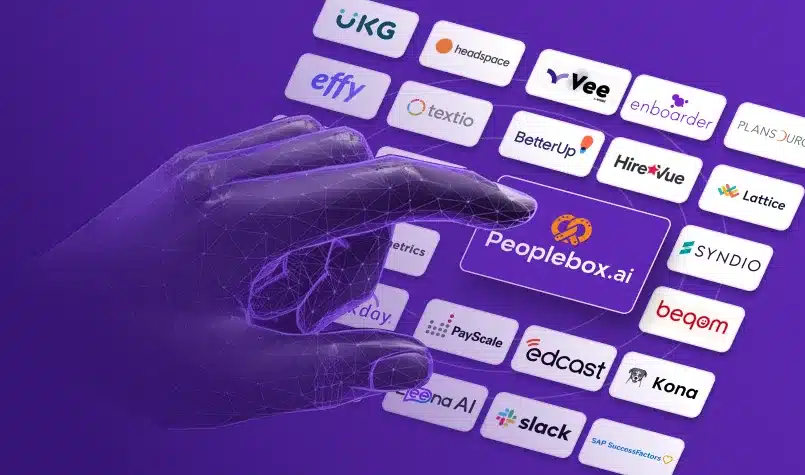
- Integration Capabilities The best AI HR software seamlessly connects with your existing tech stack: your HRIS, ATS, communication tools (Slack, Teams), calendar systems, and payroll platforms. Fragmented systems create data silos that limit AI’s effectiveness.
- Real-Time Analytics and Reporting Access to live dashboards showing key HR metrics, employee sentiment trends, recruitment pipeline health, and performance data helps you make informed decisions quickly rather than waiting for monthly reports.
Top AI Tools for HR Teams in 2026
AI is revolutionizing HR by making processes faster, more accurate, and easier to manage. These tools help HR teams streamline tasks, enhance employee experiences, and drive better business outcomes, whether it’s hiring, employee engagement, or performance management.
| Category |
AI Tool |
Best For |
Pricing |
| Hiring & Talent Acquisition |
Peoplebox.ai |
Mid-market, Enterprise |
Custom |
| SeekOut |
Enterprise HR |
Custom |
| HireVue |
Enterprise HR |
Custom |
| Jobvite |
SMBs to Mid-market HR |
Custom |
| Phenom People |
Enterprise HR |
Custom |
| Employee Engagement |
Peoplebox.ai |
SMBs, Mid-market |
Custom |
| Bonusly |
SMBs, Mid-market |
Starts at $2/user |
| Helpjuice |
Mid-market, Enterprise |
Starts at $249/month |
| Performance Management |
Lattice |
SMBs, Mid-market |
Starts at $11/user |
| Peoplebox.ai |
SMBs, Mid-market |
Custom |
| 15Five |
SMBs, Mid-market |
Starts at $7/user |
| Effy |
SMBs, Mid-market |
Custom |
| Employee Growth and Succession Planning |
Cornerstone OnDemand |
Enterprise HR |
Custom |
| Kona |
Mid-market, Large HR |
Custom |
| Plum |
Mid-market, Large HR |
Custom |
| Woebot |
All Companies |
Free + Paid |
| LifeWorks |
Enterprise HR |
Custom |
| Thrive Global |
All Companies |
Custom |
| Diversity, Equity, and Inclusion (DEI) |
Textio |
Enterprise HR |
Custom |
| Diversio |
Enterprise HR |
Custom |
| CultureAmp |
Mid-market to Large HR |
Custom |
AI Tools for Hiring and Talent Acquisition
1. Peoplebox.ai
Peoplebox.ai is an AI-driven platform that uniquely combines talent acquisition and talent management in one unified solution.
Unlike traditional recruitment tools that operate in isolation, Peoplebox.ai leverages real-time data from performance management, OKRs, and employee development to inform hiring decisions. This creates a seamless feedback loop where insights from current employee performance directly enhance future hiring quality.
Peoplebox’s AI analyzes resumes at scale, screens candidates based on skills and cultural fit, and continuously learns from your organization’s hiring outcomes.
What sets Peoplebox apart is its ability to connect the dots between recruitment, onboarding, performance tracking, and employee growth, all within a single interface.
HR teams can see not just who to hire, but how new hires are likely to perform based on patterns from existing high performers.
Best For: Automates high‑volume hiring with AI‑led interviews that screen, assess, and shortlist candidates at scale. Enables faster, bias‑reduced evaluation of large candidate pools by analyzing verbal responses, tone, and skills‑based answers across thousands of interviews.
Features:
- AI-powered resume screening with customizable job-matching algorithms
- Cultural fit assessment using behavioral analysis
- Bulk resume parsing and candidate shortlisting
- Integration with performance management and OKR tracking
- Real-time hiring analytics and pipeline insights
- Automated feedback collection and sentiment analysis
- Predictive analytics for employee success and retention
- Seamless connection between TA and TM data
Pros:
- Unified platform eliminates the need for multiple tools
- AI learns from your organization’s specific performance patterns
- Real-time insights from both recruitment and employee performance
- Strong integration capabilities with the existing HR tech stack
- Customizable to fit various industry needs
- Comprehensive analytics across the entire employee lifecycle
Cons:
- May require initial setup time for optimal AI training
- Custom pricing may not suit very small teams with limited budgets
- Learning curve for teams new to integrated TA/TM platforms
Ratings:
G2: 4.6/5 (Based on 360+ reviews)
Pricing:
Custom pricing based on team size and requirements.
View pricing page
Customer Testimonial:
“Since we started using Peoplebox.ai, we have been able to bring all of our leadership across the organization together and show them how all of our goals align.”
Jaclyn Hoover,
Senior Director HR, Propel School
2. SeekOut
SeekOut is an AI-powered talent sourcing platform that excels at finding hard-to-reach candidates through advanced search algorithms. The platform mines public databases, professional networks, and online communities to identify candidates who may not be actively job hunting but possess the exact skills and experience you need.
Best For: Finds hard-to-reach, diverse talent using deep AI sourcing across hidden and passive candidate pools.
Features:
- Advanced diversity filters and analytics
- Boolean and AI-powered search capabilities
- Talent pipeline analytics and CRM integration
- Real-time market intelligence
Pros:
- Exceptional diversity sourcing capabilities
- Vast candidate database access
- Reduces time-to-hire significantly
Cons:
- Premium pricing may be prohibitive for smaller companies
- Requires training to maximize advanced features
Ratings:
G2: 4.3/5
Pricing:
Custom enterprise pricing.
3. HireVue:
HireVue pioneered AI-driven video interviewing, using machine learning to assess candidate responses beyond just what they say. The platform analyzes verbal content, communication patterns, and behavioral indicators to provide hiring teams with deeper insights into candidate suitability.
Best for: Scales high-volume hiring with AI-powered video interviews that assess beyond the resume.
Features:
- Asynchronous video interviews
- AI-driven competency assessment
- Structured interview guides
- Candidate comparison tools
Pros:
- Significantly reduces time-to-hire
- Improves candidate experience with flexible scheduling
- Scalable for high-volume hiring
Cons:
- High initial investment starting at $35K
- Candidates may feel uncomfortable with AI evaluation
Ratings:
G2: 4.1/5
Pricing:
Starts at $35,000 annually.
4. Jobvite
Jobvite transforms recruitment into a relationship-building process rather than a transactional activity. Its AI-powered CRM maintains ongoing connections with top candidates even after hiring cycles end, ensuring you have warm talent pools ready when new positions open.
Best for: Turns recruitment into relationship-building with AI-driven talent CRM and nurture automation.
Features:
- AI-powered candidate tracking and nurture campaigns
- Talent pool segmentation
- Pipeline analytics and social recruiting tools
Pros:
- Reduces candidate ghosting
- Builds sustainable talent pipelines
- Excellent for competitive talent markets
Cons:
- Requires consistent data hygiene to be effective
- Learning curve for maximizing CRM features
Ratings:
G2: 4.0/5
Pricing:
Starts at $400/month with custom enterprise plans.
5. Phenom People
Phenom People reimagines the candidate journey as a personalized experience rather than a generic application process. The platform’s AI acts as a virtual recruiter, guiding candidates to roles that match their skills and interests while answering questions in real-time through intelligent chatbots.
Best for: Personalizes the entire candidate journey with AI-driven career site experiences and smart job matching.
Features:
- AI-powered career site personalization
- Intelligent chatbots for candidate queries
- Dynamic job recommendations
- Career path suggestions
Pros:
- Significantly improves candidate engagement
- Reduces time-to-apply
- Enhances employer brand perception
Cons:
- Enterprise-level pricing not accessible to smaller companies
- Implementation requires dedicated resources
Ratings:
G2: 4.4/5
Pricing:
Custom enterprise pricing
AI Tools for Employee Engagement
6. Peoplebox.ai:
Peoplebox.ai transforms employee engagement from an annual checkbox exercise into a continuous, actionable process. The platform automates the entire feedback cycle from survey creation and distribution to analysis and insight generation. Unlike traditional survey tools that simply collect data, Peoplebox’s AI identifies patterns, sentiment trends, and emerging issues before they become serious problems.
The platform’s chat-based survey bot integrates directly into Slack and Teams, making it effortless for employees to share feedback without leaving their workflow.
AI algorithms analyze responses in real-time, detecting sentiment shifts, identifying at-risk employees, and surfacing actionable insights for managers.
Best For: Turns ongoing employee feedback into real‑time, AI‑driven engagement insights that surface trends, risks, and opportunities across teams. Integrates natively with Slack and Microsoft Teams to deliver actionable insights directly in the channels where employees already communicate.
Features:
- Automated and recurring pulse surveys
- Anonymous feedback channels
- Real-time sentiment analysis and insights
- Chat-based survey bot
- Slack/Teams integration
- Ready-to-use survey templates
- Custom questions and engagement drivers
- Automated reminders and trend analysis over time
Pros:
- High response rates due to seamless integration
- Real-time insights enable quick action
- Anonymous features encourage honest feedback
- Reduces admin time with automation
- Connects engagement with performance data
- Customizable to specific organizational needs
Cons:
- Requires consistent deployment for best results
- May need change management for adoption
- Custom pricing may not suit very small teams
Ratings:
G2: 4.6/5
Pricing:
Starts at $7 per user per month; custom pricing available.
7. Bonusly:
Bonusly makes employee recognition continuous, visible, and meaningful by combining peer-to-peer recognition with AI analytics. The platform’s AI tracks recognition patterns to identify high-performing employees, frequently praised behaviors, and team dynamics that might otherwise go unnoticed.
Best for: Makes recognition continuous and measurable with AI-powered peer rewards and culture analytics.
Features:
- Peer-to-peer recognition with points system
- AI-powered recognition tracking and analytics
- Personalized reward recommendations
- Integration with Slack, Teams, and HRIS
Pros:
- Boosts morale and engagement significantly
- Provides visibility into company culture
- Easy to use with high adoption rates
Cons:
- Recognition culture requires active participation
- Points budgets need careful management
Ratings:
G2: 4.7/5
Pricing:
Appreciate: $2/seat/month (billed annually); Connect: $5/seat/month; Achieve: $7/seat/month.
8. Helpjuice:
Helpjuice transforms internal communication by creating a centralized, AI-powered knowledge base where employees can find answers instantly. The platform’s AI-driven search understands natural language queries and surfaces the most relevant documentation, reducing dependency on HR for routine questions.
Best For: Reduces HR dependency with an AI-powered knowledge base that delivers instant, accurate answers.
Features:
- AI-powered search with natural language processing
- Intelligent chatbot for instant answers
- Multilingual support with AI translation
- Collaboration and version control
Pros:
- Dramatically reduces repetitive HR inquiries
- Improves employee self-service capabilities
- Excellent for remote and distributed teams
Cons:
- Requires initial content creation investment
- Effectiveness depends on keeping content updated
Ratings:
G2: 4.4/5
Pricing:
Starts at $249/month with scalable plans.
AI Tools for Performance Management
9. Lattice:
Lattice revolutionizes performance reviews by using AI to help managers write clearer, more actionable feedback. The platform’s Writing Assist feature analyzes feedback as managers type, suggesting improvements in clarity, specificity, and inclusivity.
Best For: Improves feedback quality and reduces bias with AI-powered writing assist built into performance reviews.
Features:
- AI Writing Assist for feedback improvement
- Bias detection in reviews
- Trend analysis across performance data
- Goal tracking and OKR alignment
Pros:
- Significantly improves feedback quality
- Reduces bias in performance reviews
- Strong analytics and reporting
Cons:
- Pricing can be high for smaller organizations
- Requires cultural buy-in for effectiveness
Ratings:
G2: 4.5/5
Pricing:
Starts at $11/person/month (billed annually)
10. Peoplebox.ai
Peoplebox.ai transforms performance management from a quarterly administrative burden into a continuous, data-driven process. The platform’s AI automates feedback collection from multiple sources: peers, managers, direct reports, and self-assessments, then consolidates everything into actionable insights. Unlike tools that simply collect data,
Peoplebox analyzes patterns across performance metrics, goal achievement, and engagement to give managers and HR leaders a complete picture of employee performance.
What sets Peoplebox apart is its ability to connect performance data with hiring decisions, engagement scores, and career development plans within one unified platform. The AI identifies high performers, predicts performance trends, and suggests personalized development paths based on individual strengths and growth areas. Customizable performance reports provide exactly the insights leaders need without drowning them in data.
Best For: Connects performance, hiring, and engagement data in one platform to drive continuous, data-backed growth.
Features:
- Automated feedback collection from multiple sources
- AI-generated performance insights and trend analysis
- Continuous performance tracking
- Customizable performance reports
- Goal and OKR alignment
- Integration with talent acquisition data
- Real-time performance dashboards
- Development plan recommendations
Pros:
- Eliminates manual performance tracking work
- Provides data-driven insights for better decisions
- Connects performance with other talent data
- Highly customizable to fit different processes
- Excellent for continuous performance culture
- Strong analytics capabilities
- Unified platform reduces tool sprawl
Cons:
- May require process changes for traditional organizations
- Custom pricing model
- Learning curve for managers new to continuous feedback
Ratings:
G2: 4.6/5
Pricing:
$7/month/person (billed annually); custom pricing available for larger teams. View pricing page
| Stop managing HR in survival mode. Start running it with clarity.
Peoplebox.ai helps you connect hiring, performance, and employee growth into one unified system, so you don’t just react to problems, you prevent them.
Book a demo and see how Peoplebox.ai turns HR into a strategic advantage |
11. 15Five: Best for AI-Driven Goal Setting and Alignment
15Five uses AI to ensure individual employee goals stay aligned with company objectives while adapting to changing business priorities. The platform’s machine learning algorithms continuously analyze goal progress, identify potential roadblocks, and suggest optimal adjustments.
Best for: Keeps individual goals aligned with company OKRs using predictive AI goal tracking and risk detection.
Features:
- AI-powered goal alignment with company OKRs
- Predictive goal achievement analytics
- Progress tracking with risk identification
- Performance review integration
Pros:
- Keeps individual and organizational goals synchronized
- Early warning system for at-risk goals
- Intuitive interface with high employee adoption
Cons:
- It can feel like extra work if not properly implemented
- Some features require higher-tier plans
Ratings:
G2: 4.6/5
Pricing:
Starts at $7.50/user/month; full platform at $16/user/month (billed annually).
12. Effy: Best for Lightning-Fast 360-Degree Reviews
Effy AI specializes in making 360-degree reviews effortless and fast. The platform promises you can launch your first comprehensive 360 review in just 60 seconds, handling everything from questionnaire setup and participant matching to progress monitoring and automated notifications.
Best for: Launches lightning-fast, AI-powered 360 reviews in minutes with zero admin overhead.
Features:
- 60-second 360 review setup
- AI-generated comprehensive review reports
- Automatic participant matching
- Slack integration for seamless workflows
Pros:
- Incredibly fast setup and deployment
- Eliminates admin work in 360 reviews
- Free pricing tier available
Cons:
- Free tier may have feature limitations
- Relatively new player with a less established track record
Ratings:
G2: 4.5/5
Pricing:
Free basic plan available
AI Tools for Employee Growth and Succession Planning
13. Cornerstone OnDemand: Best for AI-Powered Skill Gap Analysis
Cornerstone OnDemand uses sophisticated AI to assess employee competencies and identify skill gaps that could hinder career progression. The platform analyzes performance data, learning completion rates, feedback patterns, and role requirements to build comprehensive skill profiles for each employee.
Best for: Identifies skill gaps and succession opportunities with AI-driven competency mapping at scale.
Features:
- AI-driven skill gap identification
- Personalized learning recommendations
- Competency mapping across roles
- Succession planning tools
Pros:
- Comprehensive learning and development platform
- Strong AI-driven personalization
- Excellent for large organizations with complex needs
Cons:
- Can be complex to implement and configure
- Higher price point for enterprise features
Ratings:
G2: 4.0/5
Pricing:
Starts at $6/user/month with custom enterprise pricing.
14. Kona: Best for AI Leadership Coaching in Slack
Kona delivers personalized AI leadership coaching directly inside Slack, meeting managers where they already work. Unlike traditional coaching that requires scheduling sessions and waiting for responses, Kona’s AI coach provides immediate, context-aware guidance when managers face real challenges.
Best for: Delivers real-time AI leadership coaching directly inside Slack for managers in the moment.
Features:
- AI leadership coach integrated in Slack
- Personalized coaching based on company values
- Real-time advice for management challenges
- Integration with company documentation
Pros:
- Immediate coaching access when managers need it most
- Seamlessly integrated into daily workflow
- Customized to the company culture and values
Cons:
- Premium pricing at $49/user/month
- Limited to Slack users
Ratings:
G2: 4.8/5
Pricing:
$49 per user/month.
15. Plum.io: Best for Predicting Leadership Potential
Plum.io uses AI to identify future leaders by analyzing behavioral traits, cognitive abilities, and past performance data to predict leadership potential. Unlike traditional succession planning that relies heavily on subjective manager opinions, Plum’s AI provides objective, data-driven insights.
Best for: Predicts leadership potential using objective AI analysis of behavioral and cognitive traits.
Features:
- AI-driven leadership potential prediction
- Behavioral trait and cognitive ability assessment
- Growth trajectory mapping
- Personalized leadership development plans
Pros:
- Objective, data-driven succession planning
- Identifies overlooked high-potential employees
- Reduces bias in leadership selection
Cons:
- Custom pricing may be prohibitive for smaller organizations
- Requires commitment to development programs for ROI
Ratings:
G2: 4.6/5
Pricing:
Custom pricing based on organization size.
AI Tools for Employee Wellness and Mental Health
16. Woebot: Best for AI-Powered Mental Health Support
Woebot provides on-demand mental health support through an AI-powered conversational chatbot trained in cognitive-behavioral therapy (CBT) techniques. The platform recognizes emotional cues in conversation and offers tailored CBT exercises to help employees cope with stress, anxiety, and other mental health challenges.
Best for: Provides 24/7 AI-powered CBT-based mental health support through confidential conversations.
Features:
- AI chatbot with CBT techniques
- 24/7 confidential support
- Emotional cue recognition
- Mood tracking over time
Pros:
- Immediate access without appointments
- Removes stigma through confidential format
- Available anytime for global teams
Cons:
- Cannot replace professional therapy for serious conditions
- Some users prefer human counselors
Ratings: App Store: 4.7/5
Pricing: Custom pricing for enterprise deployments.
17. LifeWorks: Best for Comprehensive Wellness Monitoring
LifeWorks uses AI to continuously monitor employee well-being across mental, physical, and emotional health dimensions. The platform’s AI algorithms analyze wellness data from various sources to identify trends in individual and group wellness.
Best for: Monitors workforce wellness holistically with AI-driven insights across mental, physical, and emotional health.
Features:
- AI-driven wellness data analysis
- Mental, physical, and emotional health monitoring
- Real-time insights on employee well-being
- Proactive wellness intervention recommendations
Pros:
- Comprehensive view of employee wellness
- Proactive rather than reactive approach
- Strong analytics for program optimization
Cons:
- Enterprise-level pricing limits accessibility
- Implementation complexity for smaller HR teams
Ratings: G2: 4.2/5
Pricing: Custom enterprise pricing.
18. Thrive Global: Best for Burnout Prevention
Thrive Global’s AI analyzes employee behavior patterns, work habits, and emotional health indicators to detect early warning signs of burnout. The platform identifies risk factors like prolonged stress periods, heavy workloads, insufficient breaks, and declining engagement.
Best for: Detects burnout early using AI that analyzes work patterns and behavioral risk signals.
Features:
- AI-powered burnout detection
- Real-time risk analysis based on work patterns
- Personalized wellness intervention recommendations
- Behavior change programs
Pros:
- Proactive burnout prevention rather than reactive response
- Personalized interventions increase effectiveness
- Supports sustainable performance culture
Cons:
- Requires employee engagement with platform
- Monitoring work patterns raises privacy questions
Ratings: G2: 4.3/5
Pricing: Custom pricing based on organization size.
AI Tools for Diversity, Equity, and Inclusion (DEI)
19. Textio: Best for Bias-Free Job Descriptions
Textio uses AI to analyze job descriptions and identify language that may unintentionally exclude candidates based on gender, ethnicity, age, or other factors. As you write job postings, Textio’s AI provides real-time feedback on bias-inducing phrases and suggests more inclusive alternatives.
Best for: Eliminates bias in job descriptions with real-time AI language analysis and inclusivity scoring.
Features:
- Real-time bias detection in job descriptions
- Inclusive language suggestions with evidence-based recommendations
- Gender tone analysis
- Impact prediction on candidate diversity
Pros:
- Significantly improves diversity in applicant pools
- Real-time feedback improves writing immediately
- Evidence-based rather than theoretical
Cons:
- Enterprise pricing may limit accessibility
- Effectiveness depends on following the recommendations
Ratings: G2: 4.4/5
Pricing: Custom enterprise pricing.
20. Diversio: Best for Real-Time DEI Metrics and Tracking
Diversio uses AI to track and measure DEI metrics in real-time, providing HR teams with data-backed insights into diversity and inclusion performance. The platform analyzes employee demographics, engagement scores, promotion rates, retention patterns, and other key indicators to identify gaps and areas requiring improvement.
Best for: Tracks and improves DEI performance with real-time AI analytics across workforce data.
Features:
- Real-time DEI data tracking and analytics
- Demographic analysis across organizational levels
- Engagement tracking by employee groups
- Industry benchmarking
Pros:
- Comprehensive DEI analytics in one platform
- Identifies hidden patterns and biases
- Actionable recommendations drive improvement
Cons:
- Enterprise pricing limits small company access
- Requires careful communication about monitoring
Ratings: G2: 4.5/5
Pricing: Custom enterprise pricing. Request pricing details
21. CultureAmp: Best for Inclusive Culture Insights
CultureAmp’s AI analytics provide deep insights into how inclusive a company’s culture actually is by analyzing employee feedback, behaviors, and engagement across diverse teams. The platform goes beyond surface-level diversity numbers to understand the lived experiences of employees from different backgrounds.
Best for: Measures real inclusion, not just diversity numbers, using AI-driven employee experience insights.
Features:
- AI-driven cultural analysis across demographics
- Inclusive workplace insights from employee feedback
- Employee experience tracking by group
- DEI survey templates and benchmarks
Pros:
- Measures actual inclusion beyond diversity statistics
- Comprehensive employee feedback analysis
- Strong benchmarking against similar organizations
Cons:
- Custom pricing can be expensive
- Requires consistent survey participation
Ratings: G2: 4.5/5
Pricing: Custom pricing based on company size.
Things to Keep in Mind When Using AI Tools in HR
Clearly, AI can optimize work processes across the spectrum. However, we must use it responsibly as it remains an evolving technology. Here are some key considerations:
1. Watch Out for Biases
AI systems can perpetuate existing biases if trained on biased data, leading to unfair decisions in critical areas like hiring, promotions, and layoffs. To prevent this, regularly audit your AI tools for bias or unfairness. Ensure these tools are used ethically to support fair and just outcomes.
2. Keep the Human Touch
While AI can handle everything from recruiting and onboarding to training and performance evaluations, don’t lose sight of the importance of human contact. Without real people, workplaces can feel cold and impersonal. Balance AI-driven efficiency with personal interactions to create welcoming, supportive environments.
3. Transparency in AI Decisions
Understanding how AI tools make decisions is essential. These systems use complex algorithms based on large datasets to make predictions or choices. Help candidates and employees understand the criteria and processes AI uses for decisions affecting them. Transparency increases trust within your organization.
4. Data Privacy and Security
Choose tools with built-in privacy features to safeguard sensitive information. Ensure AI tools comply with data protection regulations such as GDPR and CCPA. Work closely with your organization’s compliance and security teams to keep data safe. Prioritizing data privacy and security protects both your company and the personal information of employees and candidates. Using a proxy server adds an extra layer of protection by securely routing sensitive data and reducing exposure to external threats.
Why AI Can’t Replace HR Strategy, Culture, or Empathy
AI handles the data. You handle humanity. No algorithm can replace:
- A compassionate conversation
- Understanding someone’s unspoken career dreams
- Building trust during a difficult performance review
What AI tools can do is give you time to actually do those human things, whether that’s mentoring a struggling employee, addressing team conflict, or offering guidance to someone navigating career decisions.
Feature Spotlight: Peoplebox.ai – GenAI for All Your Talent Acquisition and Management Needs
Why Peoplebox.ai Stands Out:
Peoplebox.ai is the only unified platform that integrates Talent Acquisition (TA) and Talent Management (TM) seamlessly. Forget juggling multiple tools. With Peoplebox.ai, you leverage real-time data from performance management, OKRs, and candidate screening all within one solution.
How Peoplebox.ai Solves HR Challenges
- Unified Talent Strategy: Use one tool to connect hiring decisions, performance reviews, and employee growth plans.
- Comprehensive Insights: From creating unbiased job descriptions to enriching resumes and managing OKRs, every talent touchpoint is streamlined.
- Data-Driven Decisions: Align hiring, performance, and development decisions using granular, real-time insights.
Request a Demo → |
FAQ
1. How should HR professionals approach AI integration for the first time?
Start small by selecting one HR area like resume screening or pulse surveys where AI can add immediate value. Choose user-friendly tools, gather feedback, and gradually expand to other functions like performance management and onboarding once you’re comfortable.
2. What are the biggest advantages of integrating AI into HR processes?
The biggest advantages include increased efficiency through automation, data-driven decision-making with predictive analytics, enhanced accuracy, personalized employee experiences, predictive capabilities for turnover and hiring needs, and significant cost reduction.
3. What types of HR tasks are best suited for AI automation?
AI automation works best for repetitive, data-intensive tasks like resume screening, interview scheduling, benefits administration, payroll processing, compliance monitoring, employee feedback collection, routine HR inquiries, onboarding/offboarding workflows, and performance review administration.
4. How do you measure the ROI of AI in HR?
Measure ROI by tracking time saved on administrative tasks, reduction in cost-per-hire and time-to-hire, decreased turnover rates, improved quality of hire, increased engagement scores, fewer compliance violations, and improved accuracy in payroll and benefits administration.
5. How can AI improve internal communication in HR?
AI improves internal communication through intelligent knowledge bases, 24/7 chatbots for routine inquiries, personalized search, automated notifications, translation capabilities, sentiment analysis, and document summarization, making HR information more accessible while reducing response times.
6. How can small businesses benefit from AI tools in HR?
AI provides enterprise-level capabilities without requiring large HR teams, automating time-consuming tasks and freeing staff for strategic work. It helps small companies compete for talent, manage benefits administration, and ensure compliance affordably.