Every sector, including HR, is rapidly adopting AI in 2024. As of early 2024, about 38% of HR leaders are actively piloting or have already implemented generative AI technologies within their operations, showing a significant increase from 19% in mid-2023. This is in line with another survey where 61% of CHROs planned to invest in AI in 2024.
In today’s fast-paced business environment, boosting productivity is essential for staying ahead. Whether you’re an HR professional, a project manager, or a business leader, productivity tools can help streamline workflows, foster collaboration, and ensure you meet your goals efficiently. Whether you’re managing a small startup or running a large corporation, staying organized and efficient is critical to driving growth.
With the rise of digital tools, businesses can now access many productivity solutions that streamline workflows, automate routine tasks, and enhance collaboration. From project management to communication platforms, the right tools can transform how your team operates.
Here’s a roundup of the 25 best productivity tools in 2024, including solutions tailored to businesses of all sizes and industries.
Before we dive into the list of Best Productivity Tools in 2024, let’s understand what kind of productivity tools are for businesses.
What are Productivity Tools?
Productivity tools are software applications designed to help individuals and teams work more efficiently and effectively. They allow users to streamline daily tasks, automate repetitive processes, and manage workloads with ease. By reducing manual efforts and organizing information, these tools ensure that businesses can operate at peak performance.
For businesses, productivity tools play a critical role in enhancing overall efficiency. Whether it’s managing projects, tracking goals, or collaborating with team members, these tools help create a structured workflow, making it easier for everyone to stay on the same page. The benefits of using productivity tools are immense, ranging from saving time to improving collaboration and ensuring timely project delivery.
In essence, productivity tools are essential for achieving the best productivity in any workplace, enabling individuals and teams to focus on high-priority tasks, reduce errors, and drive better results.
Quick Glance: Top Productivity Tools by Category
We’ve highlighted two standout tools per category to help you compare quickly. Additional tools and deeper explanations are covered in the detailed sections below.
Category
Tool Name
Why It Stands Out
Project Management
Peoplebox.ai
Best for OKRs, performance reviews, employee alignment, and real-time feedback.
Asana
Great for scalable task management, workflows, deadlines, and automation.
Communication
Slack
Async collaboration, channels, integrations, and internal knowledge sharing.
Zoom
High-quality remote meetings, screen sharing, webinars, and team events.
Marketing
HubSpot
CRM + marketing automation, unified customer data, and campaign orchestration.
Mailchimp
Simple email automation, templates, analytics, and segmentation for SMBs.
Notes / Documentation
Notion
All-in-one team workspace for docs, wikis, tasks, and collaboration.
Todoist
Personal task prioritization with reminders and calendar syncing.
Calendar / Time Tracking
Google Calendar
Shared scheduling, reminders, meetings, and unified availability.
Clockify
Precise time tracking, project analytics, and billing support.
Invoicing
Billdu
Best for small teams — invoicing, quotes, expenses, and inventory in one place.
AI Productivity
ChatGPT
Automates content, processes, support, and idea generation.
Fireflies.ai
Real-time meeting transcription, summaries, and action insights.
Best Productivity Tools in 2024
1. Project management Tools
Peoplebox.ai
When it comes to aligning teams, enhancing productivity, and driving company performance, Peoplebox.ai is the ultimate solution. It’s an all-in-one platform designed to help HR professionals and business leaders achieve operational excellence. With features like OKR tracking, performance management, and real-time feedback, Peoplebox.ai offers everything you need to manage goals and performance effectively.
Key Features:
OKR Management: Align individual and team goals with company objectives.
Performance Reviews: Simplify and automate the performance review process.
One-on-One Meetings: Keep communication flowing and productivity high with structured meeting notes and action items.
Why Peoplebox.ai? Peoplebox.ai’s intuitive interface and deep integration with popular work tools make it a must-have for any company looking to improve its people processes and overall productivity.
ProofHub
ProofHub is an all-in-one project management and collaboration platform built to help teams get more done in less time. The tool can help you centralize projects, tasks, discussions, files, and approvals in one place to help the teams stay organized and productive.
This tool replaces the need to keep multiple tools and makes your team productive than ever. Flat pricing structure (not per-user fee) makes ProofHub scalable for growing teams, compared to other tools that charge per user.
Key Features:
Centralized workspace for projects, tasks, and files
Built-in proofing & markup for faster creative reviews
Kanban boards, Gantt charts, and calendars for visual planning
Time tracking and reports for productivity insights
Team collaboration with chat, discussions, and announcements
Time Champ
Time Champ is a Workforce Intelligence platform that provides comprehensive workforce visibility, operational clarity, and deep productivity insights. It shifts focus from clocking hours and tasks to understanding team performance, spotting inefficiencies, and enabling smarter, faster decisions.
Built for field teams, Time Champ functions as an intelligent field employee tracking software, offering real-time reporting and decision-grade analytics that uncover utilisation trends, emerging bottlenecks, and burnout risks; empowering leaders to streamline operations and optimise outcomes.
Key Features:
Intelligent Workforce Analytics
Seamless Task & Project Management
Advanced Location-Based Tracking
Insight-Rich Dashboards & Analytics
Automated Attendance & Leave Management
Real Time Activity Tracking
Adaptive Custom & Detailed Reporting
Asana
Asana remains one of the best productivity tools for project management in 2024. It’s a powerful yet simple solution that helps teams organize work, track progress, and hit deadlines with ease. The visual timelines, task dependencies, and workflow automation help teams stay on top of their tasks.
Key Features:
Task management and prioritization.
Workflow automation and customizable boards.
Reporting features for project tracking.
Trello
For teams that love visual tools, Trello offers a flexible and user-friendly way to manage projects. Its drag-and-drop interface, along with boards, lists, and cards, makes task organization intuitive.
Key Features:
Visual project management with boards and lists.
Workflow automation with Trello’s Butler.
Integration with other productivity tools like Google Workspace and Slack.
Monday.com
Monday.com offers robust project management capabilities designed for remote teams. Its versatility allows teams to manage everything from simple to complex workflows, making it one of the best productivity tools for companies with diverse needs.
Key Features:
Customizable workflows and automation.
Real-time collaboration with dashboards and timelines.
Integration with popular tools like Slack and Zoom.
2. Communication Tools
Slack
Collaboration is key to productivity, and Slack is one of the best productivity tools for seamless team communication. From chat groups and private messaging to integrations with tools like Google Drive and Zoom, Slack keeps everyone connected and on the same page.
Key Features:
Channels for different projects or teams.
Integration with hundreds of tools.
Instant messaging and file sharing.
Microsoft 365
Microsoft 365 (formerly Office 365) continues to be one of the best productivity tools for businesses. It combines Microsoft’s powerful suite of apps, including Word, Excel, PowerPoint, Teams, and OneDrive, offering a comprehensive solution for productivity and collaboration.
Key Features:
Cloud-based document creation and collaboration.
Seamless communication through Microsoft Teams.
Secure file sharing and storage.
Skype
Skype is an extremely dynamic communication tool that changes the way companies interact and work. Boasting the most versatile features, it empowers teams to maintain effective communication, whether it’s brainstorming new ideas in a virtual meeting or just updates in real time. Skype makes sure distance is no barrier to productivity, making it an invaluable asset in modern workplaces.
Key Features:
High-Definition Video Conferencing
Instant Messaging to share updates
Screen Sharing helps in effective collaboration
Zoom
In 2024, remote and hybrid work models remain popular, making Zoom a crucial tool for productivity. Zoom offers high-quality video conferencing, screen sharing, and webinar solutions, enabling teams to stay connected no matter where they are.
Key Features:
Video and audio conferencing.
Screen sharing and breakout rooms for better collaboration.
Webinar and event hosting capabilities.
Google Workspace
For document collaboration and team communication, Google Workspace (formerly G Suite) is a productivity powerhouse. Tools like Gmail, Google Docs, Sheets, and Drive, allow teams to work together in real time, no matter their location.
Key Features:
Real-time collaboration on documents.
Cloud storage and file sharing.
Powerful email and calendar management tools.
3. Marketing Tools
Hubspot
The best teamwork software to launch, manage, and sustain your marketing efforts and campaigns is in the Marketing Hub. All your customer interactions are stored and shared so everyone on your team can view, engage, and connect with any potential customer and coordinate with your team.
Key Features
Data sync between Marketing, Customer Service, and Sales teams
Contact database and contact management
Shared conversations for each contact
Litmus
Litmus is perhaps one of the best productivity tools for email marketing. It is highly versatile and makes your email management easier, faster, and better. Perhaps the easiest way for teams to create a great email for every subscriber that may be opened with ease in many different apps and devices.
Key Features:
Build, edit, and instantly preview your emails
Get full visibility into every aspect of your email program
Test critical elements that could impact email performance
Mailchimp
Mailchimp is an email marketing platform that makes this activity less complicated for businesses of any size. As a company, Mailchimp makes sure that the task of email marketing would be efficient and easy to do for those companies. Its automation feature, which gives it strong analytics, helps businesses get through to their audiences effectively, making potential customers loyal clients.
Key Features:
Email Automation to reach your audience at the right time.
Customizable Templates using a variety of professionally designed templates.
Comprehensive Analytics with detailed reports and insights to refine your strategy.
4. Notes making Tools-
Notion
Notion is the ultimate productivity app for those who like to have everything in one place. From creating to-do lists to managing projects and databases, Notion provides a collaborative workspace that boosts team efficiency.
Key Features:
Customizable workspace for notes, tasks, and projects.
Collaboration tools for sharing and working on documents in real time.
Integration with tools like Slack and Google Drive.
Todoist
Todoist is a personal productivity tool perfect for task management and to-do lists. It helps you stay on top of your daily tasks and projects by prioritizing and organizing everything in one place.
Key Features:
Task management with priority levels.
Integration with Google Calendar, Slack, and more.
Mobile app for managing tasks on the go.
Evernote
Evernote is a trusted note-making app that allows you to remember everything. It’s one of the best Android apps for productivity – it lets you stay organized and get more done. With Evernote, you can capture, organize, and share notes anywhere so that your best ideas are always with you and in sync.
Key Feature:
Collect everything in one place and make it more accessible
Add attachments, links, and audio recordings
Scan and search for information from business cards
Google Keep
Google Keep is a complete feature note-taking application quite simple and handy for jotting down reminders, recording ideas, creating checklists, meeting notes, to-do lists, or any such thing. To your delight, you also get to enjoy digital sticky notes, and since it is a part of G-suite, you get to make it integrate your notes into Google Docs. It works well on Android phones, iPhones, Google Chrome, Firefox, or even Smartwatch.
Key Features:
Two types of reminders – time and locative.
Audio recordings using Google’s speech-to-text engine
Sync to Chrome and Web app
Colour-code your notes.
Location reminder when you are in some location
Dropbox
Dropbox is one of the best productivity tools for note-making. It is an online word processor that brings all ideas to life, created with the opportunity of teams in one place. This software has an ultralight interface which makes conversations more connected and more lively by using stickers and emojis.
Key Features:
Anyone can see and update Dropbox files in a Paper doc
Changes are automatically saved
Seamless presentations
5. Calendar Tools-
Google Calander
Google Calendar is a wide-ranging tool with many uses in business. It helps keep track of things by managing time efficiently. The designs are intuitive, allowing users to schedule meetings, set reminders, and even share their calendars with members of the team. Everything on the same page is kept by Google Calendar; therefore, there is easier collaboration and better management of time.
Key Features:
Event Scheduling with built-in notifications.
Calendar Sharing to coordinate schedules for better teamwork.
Integration to stay in sync with all other Google apps for an integrated workflow.
Clockify
Clockify is a full-fledged time-tracking tool for businesses and freelancers to manage their work hours, improve productivity, and thereby ease the process of billing. Clockify has an easy-to-use interface. Users can track time spent on tasks and projects, which will make their reporting as accurate as possible, and it is an excellent tool for teams who want to be more efficient and keep track of progress in real time.
Key features:
Time Tracking on specific tasks or projects with ease.
Project Reporting to analyze time spent and improve productivity.
Monitor team members’ time and assign tasks for better workflow management.
6. Invoicing Tools-
Billdu
Billdu is an invoicing and expense tracking software designed to help small businesses and freelancers manage their finances efficiently. It offers tools for creating professional invoices, managing estimates, and tracking expenses.
Key features:
Customizable invoices and quotes
Real-time expense tracking and reporting
Inventory management and product tracking
Multi-currency support and online payment integration
Mobile app for invoicing on the go
Client communication and invoice reminders
AI Tools for Increasing Productivity
Artificial intelligence has made life much easier. It has reduced the manual workload and has truly become everybody’s pal. These AI tools have also made their way into business activities. Here is a list of tools which can guarantee an increase in productivity:
1. Gen-AI Tools –
ChatGPT
ChatGPT is an AI-powered conversational tool designed for advanced use, ranging from answering questions to generating content and customer service for businesses as well as people. Natural language processing applications enable ChatGPT to engage meaningfully in conversations, solve problems, and automate routine tasks, providing a versatile means of improving productivity while offering a wide breadth of improvements for its users.
Key Features:
Contextual Conversation with dynamic, human-like interactions to solve complex queries.
Quickly create articles, reports, and other written content with ease.
Automate repetitive tasks like customer inquiries and data processing.
Gemini
Gemini is Google’s AI-powered tool designed to revolutionize how users interact with information, blending conversational AI with powerful search and assistance capabilities. As a successor to Google’s previous AI models, Gemini brings advanced understanding, creativity, and adaptability to a wide range of tasks, from generating content to answering complex queries. Its seamless integration with Google’s ecosystem makes it a powerful assistant for businesses and individuals alike.
Key Features:
Advanced Conversational AI.
Generate high-quality text, reports, or ideas based on user input or queries.
Works fluidly with Google’s products, enhancing productivity across Search, Docs, and other tools.
Many other tools like Bard, Perplexity, Claude, and Midjourney help in similar ways.
2. AI-Powered Presentation Tools-
Decktopus
Decktopus is a ‘smart presentation assistant’ that makes developing the perfect, professional-looking presentations quickly and very efficiently. Decktopus offers AI-driven suggestions that help its users create well-structured slides, actually suggesting content, design, and layout. Perfect for businesspeople or others needing to craft a high-impact presentation without the inconvenience of manual formatting.
Key Features:
AI-Powered Slide Creation of content and layouts based on the user’s input.
Customizable professional templates to fit different presentation styles.
Interactive Elements like polls, quizzes, and forms make presentations more interactive.
Beautiful.ai
Beautiful.ai is an intelligent presentation design software that simplifies the entire process of design for users to put together very impressive and professional-looking presentations right away. With an intuitive interface and with AI-driven capabilities, any design decisions are automatically made wisely so that slides will be visually appealing with best practice alignment.
Key Features:
AI-powered design assistance to tailor and modify the layouts and designs according to the input content.
A variety of professional templates according to topics and styles.
Collaboration tools work pretty seamlessly with team members in real time.
3. AI Meeting Assistant Tools –
Fireflies.ai
Fireflies.ai is an AI meeting assistant that helps teams be more productive and efficient. Fireflies.ai achieves this by automatically capturing the most important topics of discussions during virtual meetings through note-taking. It connects to popular video conferencing tools of the company and allows transcription of real-time conversation, key point identification, and insights conversion into actionable ones. It’s a priceless tool that teams dig for in search of how to enhance collaboration without missing critical points.
Key Features:
Real-time transcription of meetings as they happen, providing accurate records for future reference.
Action Item Generation: Identifies and highlights key action items and decisions made during meetings.
Seamlessly connects with tools like Zoom, Google Meet, and Microsoft Teams for easy use.
Otter.ai
Otter.ai is a very effective transcription and collaboration tool that captures on-the-fly conversations in real-time, producing very accurate transcripts. It is best used for meetings, interviews, and lectures, which increases productivity through its ability to automatically record and organize notes, allowing the user to be focused on discussions. With Otter.ai’s integration with different platforms, it becomes the solution being sought after by teams as well as individuals in their quest for efficient documentation.
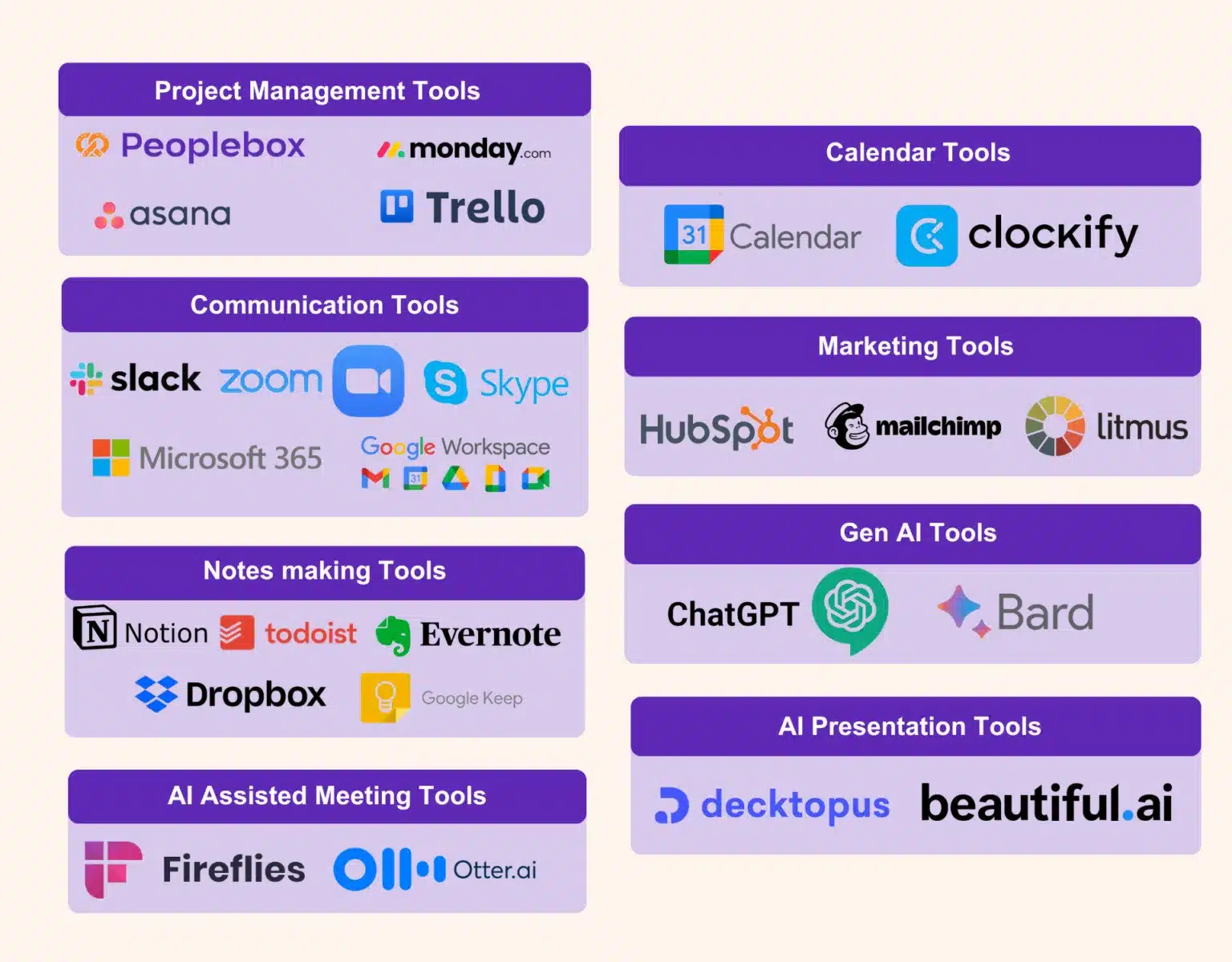
This infographic gives a comprehensive list of all the tools that we have listed here.
How to Choose the Right Tool?
It is easy to get overwhelmed with so many choices in the basket. Not every tool is right for your business. Here are some points to consider when you set out to pick the right candidate for the job:
Be clear about the purpose. There are many tools which provide the same set of services in different environments. Check the features of each tool and select the one which works for all the requirements.
Before fully committing, take a demo or trial. Most of the tools provide free demos for users to test out their interface. It would be a wise idea to involve your team as well. Get feedback from the real users of the tool.
Make sure the tool you choose is compatible with the tools you currently use, like Google Drive, Slack etc… If your business is heavily dependent on these platforms, make sure the tool you choose is easy to connect with these platforms that you are alread using.
Consider not just the cost, but also the return on investment. For example, if a tool saves you and your team hours of work each week, calculate that time saved against the tool’s cost to see if it justifies the investment.
Think about your future needs. If you plan to grow your team or expand your projects, choose a tool that can scale with you. For instance, if you start with a small team but anticipate growth, look for project management tools that can accommodate more users or features as you scale.
Peoplebox is among the best People management tools that is out there! Peoplebox is a comprehensive people management tool that integrates OKRs, continuous feedback, and employee engagement metrics. Its data-driven insights enhance team alignment and accountability, while an intuitive interface streamlines navigation.
Unlike traditional PM tools, Peoplebox prioritizes employee well-being and performance, driving productivity through a holistic approach to management. Click below for a product tour.
By implementing any of these best productivity tools in 2024, you’ll not only streamline workflows but also improve team collaboration and overall output. not only streamline workflows but also improve team collaboration and overall output.
What stood out is the deep understanding of the Peoplebox.ai team and their willingness to listen & enhance the platform to scale with our long-term needs.
Khilan Haria
VP and Head of Payments Product, Razorpay
I'm glad that we partnered with Peoplebox.ai for our company-wide OKR rollout. Thanks to its simplicity, we achieved significant adoption within two quarters
Rohit Arumugam
Business Head, Nova Benefits
Since we started using Peoplebox.ai, we have been able to bring all of our leadership across the organization together and show them how all of our goals align
Jaclyn Hoover
Senior Director HR, Propel School
Driving the entire interface through slack is simply brilliant especially for a tech product company! There was zero time spent on training! It can not get easier than that!
Swapna Nair
VP - HR, Khatabook
I chose Peoplebox.ai because it had integrations with the tools we use for sales and engineering to automate updating of key results and sync projects
How to Roll Out OKRs for First Time: 7 Steps Startegy
How to Roll out OKRs for the first time is a question common among organizations just introducing OKRs.
Imagine a scenario-
You are rolling out OKR for the first time.
One thing goes wrong and… Boom!
Your employees are already hating the process- even before it took a pace.
You certainly wouldn’t want that to happen in your organization. OKRs can surcharge and accelerate your organizational growth. But the key is to get this done right.
That’s why a well-planned rollout is significant for the success of an OKR system.
Introduce the new goal-setting approach strategically but not in a mechanical process. Every organization is unique and can face unique challenges while implementing OKRs.
[elementor-template id=”89725″]
How to roll out OKRs: Here are 7 Best Practices for a successful OKR rollout
1 Communicate the OKR Methodology to all the teams
Get everyone in the organization on board with OKRs. Present the concept clearly and precisely. Educate everyone on the OKR language.
While some people will embrace the changes with open arms, there are also going to be some skeptics into the bargain. You must let them express their concerns and provide answers to their “why, how, and what?” questions.
Explain to them the benefits of implementing the OKR framework. Highlight how it’s going to impact the business and the individual success of the employees.
Organize workshops, training, discussions, introductory presentations, and seminars to help your employees’ design quality OKRs. Transparently explain to them the strategic execution, alignment, expectations, and tools they will be required to use for the purpose.
To help everyone speak the same language, document your company OKR framework
2 Inspire with success stories
List the names of reputed companies like Google, Netflix, Intel, LinkedIn, Twitter, etc. which have successfully implemented OKRs. Narrate their success stories to help them visualize how OKRs can cater to their individual success.
For example, OKRs helped LinkedIn become a 20 Billion Company. Jeff Weiner, CEO of LinkedIn, describes OKRs as, “something you want to accomplish over a specific period of time that leans toward a stretch goal rather than a stated plan.
It’s something where you want to create greater urgency, greater mindshare.”
You can either go for an organization-wide rollout Consider running an OKR Pilot first, depending on what fits you best.
If you have a culture that’s open to change and a flexible structure of functioning, an organization-wide rollout will work best for you. But it’s always best to take small steps. Start from one part and gradually move to others.
[elementor-template id=”89725″]
Crafting and implementing OKRs across the entire organization can seem overwhelming especially if you are a large organization. Instead, choose a particular part of the organization and run a pilot project.
“If you concentrate on small, manageable steps you can cross unimaginable distances.”
It’s also important to decide “how often?” will OKRs be reviewed. Will it be done quarterly or annually?
4 Go for the Top-down approach
A top-down approach to OKRs was the first pattern attempted. The top management has a significant role in setting the overall direction of the company. Starting from the top provides clarity for the rest of the organization.
“People buy into the leader before they buy into the vision.”
For example, you can start with the senior leadership team. Make them an example to roll out OKRs to the departmental heads. From there you can move on to team leaders, and to the rest of your teams.
5 Get aligned
You can’t just sit with a blank sheet in front and magically start crafting the perfect OKRs. You need to understand the context. Make the company mission and vision your starting point and tailor your OKRs accordingly.
Buy-ins are critical for OKR success. The success of OKRs depends on the collective effort of each team member. You can imagine it as a group dance performance where everyone needs to perform their parts well to make it a masterpiece.
Thus you need to align the efforts of the workforce, executive leaders, and company heads both horizontally and vertically. This will help you foster transparency, smooth cross-functional communication, and reduce overlap among departments.
6 Track and monitor progress
Tracking OKRs are important to evaluate and measure the progress and understand which teams are falling short.
You can identify any issues and make course corrections as required by Monitoring progress.
Leverage technology to track OKRs. It will make the process transparent.
Using OKR software will also automate the calculations and save your time as you are no longer required to manually update the progress of each team member.
Bonus tip: Remember to celebrate whenever you Hit the nail on the head through OKR win meetings and shoutouts to keep
7 Do frequent check-ins
To stay on top of OKR progress, you need to do regular check-ins. Employees might feel overwhelmed with concerns and doubts, especially in the initial days.
Regular check-ins will give your employees direction. And provide them the required assistance and guidance. Frequent Check-in meetings will also identify the overlappings, increase accountability and ensure execution.
Define your preferred frequency of Check-in meetings. You can do it weekly or monthly as per your organization’s needs. Although weekly check-ins are most recommended to keep track of the progress and evaluate continuously.
Have OKR Champions
Consider having OKR champion who starts implementing the OKR framework with a strong war cry. Build a team of champions who will work as ambassadors to head the change. And make the OKR framework run smoothing across the organization.
They work as mentors and internal OKR experts. And can help you adopt and execute OKRs at all levels of the organization. These OKR enthusiasts will make sure that every concern is addressed, every ‘whys and wherefores’ are explained.
Too many objectives and key results: Less is more. Don’t set more than 5-7 Objectives and 3-5 key results.
Fill it, Forget it: Don’t set OKRs just to forget in a few days.
Mixing KPIs with OKRs: KPIs aren’t a substitution for OKRs. They have separate roles and outcomes.
Rigidity: Rigid adherence to rules can lead to disengagement. Instead, move forward with a flexible and intuitive OKR approach
Link OKRs with Recognition: Don’t make the mistake of making OKRs a base for your reward and recognition program. It can negatively affect performance. And compromises the business output.
The start is never perfect
You might struggle when you are just starting. But after a few OKR cycles, you are sure to hit your stride.
To end, OKR’s success depends on consistency. So, remember to continuously reflect, learn, and refine the process.
Hope we were able to answer all your queries in our blog How to roll out OKRs for the first time? If you have questions feel free to comment below.
Pooja Pooja
Types of OKRs: Aspirational OKRs vs Committed OKRs
Every organization wants to grow, but how do you set goals that are both achievable and visionary? The answer lies in the types of OKRs: committed and aspirational.
Whether it’s near-term performance or long-term innovation for your business, you’ll know just how to leverage the power of committed and aspirational OKRs effectively to unlock new levels of success for your business.
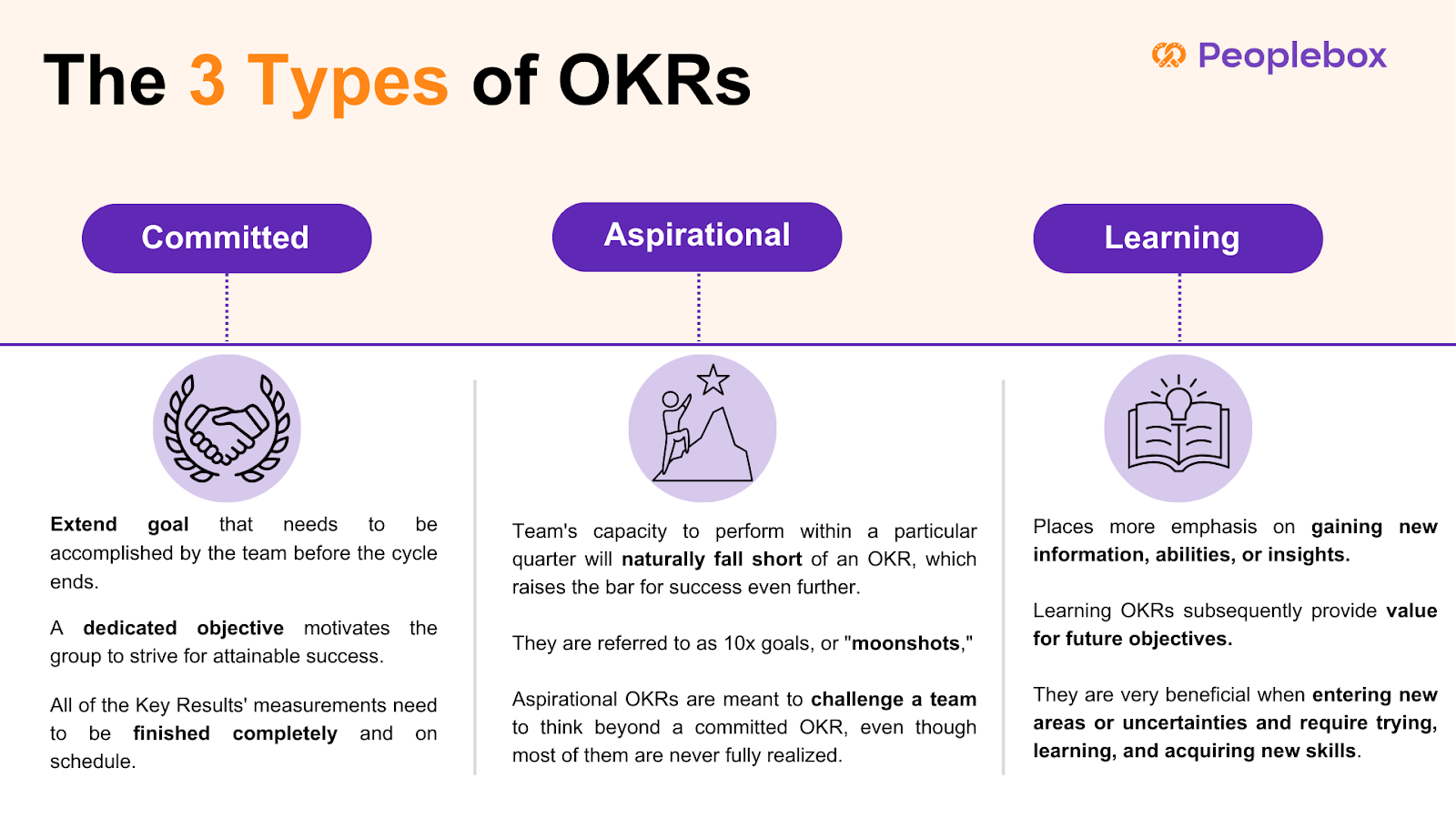
Committed OKRs are about clear, attainable targets that teams can confidently deliver within a set timeframe. This type of OKR delivers accountability and is important for day-to-day business success.
Aspirational OKRs, on the other hand; push teams to be bigger and challenge themselves. The moonshots: ambitious OKRs are meant to stretch an organization from its comfort zone, kindling innovation and long-term growth.
In the rest of this blog, we will take the difference between these two types of OKR apart and see how to balance them in such a way that they enable performance as well as inspiration.
What are Aspirational OKRs and Other Types of OKRs?
A committed OKR is a stretch goal that the team has to achieve or complete before the cycle is over. A committed goal pushes the team to reach, but still achievable attainment. All metrics of the Key Results must be completed fully and on time. Consider a situation like this:
Daniel’s organization and his teams have agreed to execute certain OKRs and have mapped a precise action plan on how they are going to do so.
These are called Committed OKRs.
An aspirational OKR sets the bar for success further out, and by design will exceed a team’s ability to execute in a given quarter. When they set such a high bar as to be seemingly impossible they are called 10x goals, or “moonshots.” While most aspirational OKRs are never fully achieved, they exist to push a team to think bigger than a committed OKR. Consider the following case:
Martha’s organization is more visionary. They have stretched goals. And her teams are not likely to fully achieve these ambitious goals.
These are called Aspirational OKRs.
Understanding the distinction between aspirational and committed goals is crucial for effective goal-setting and team motivation within the OKR framework. Aspirational goals encourage ambitious thinking and long-term vision, while committed goals focus on immediate, measurable outcomes.
Learning OKR focuses on the acquisition of knowledge, new skills, or insights rather than a direct achievement of business outputs. Extremely helpful when entering new areas or uncertainties and requires experimenting, learning, and developing new skills, Learning OKRs distinguish between usual output measuring of success and measuring acquisition of knowledge, that will later add value for future objectives. For example:
Jerry wants to gain a deep understanding of machine learning to drive full product development. He wants to finish three advanced courses and test his skills by building a model in sandbox.
These are called Learning OKRs.
Aspirational OKRs and Committed OKRs: Key differences
When you aim for the stars, you may come up short, but still reach the moon.
– Larry Page
Read on to find out the key difference between Committed OKRs and Aspirational OKRs.
Objective
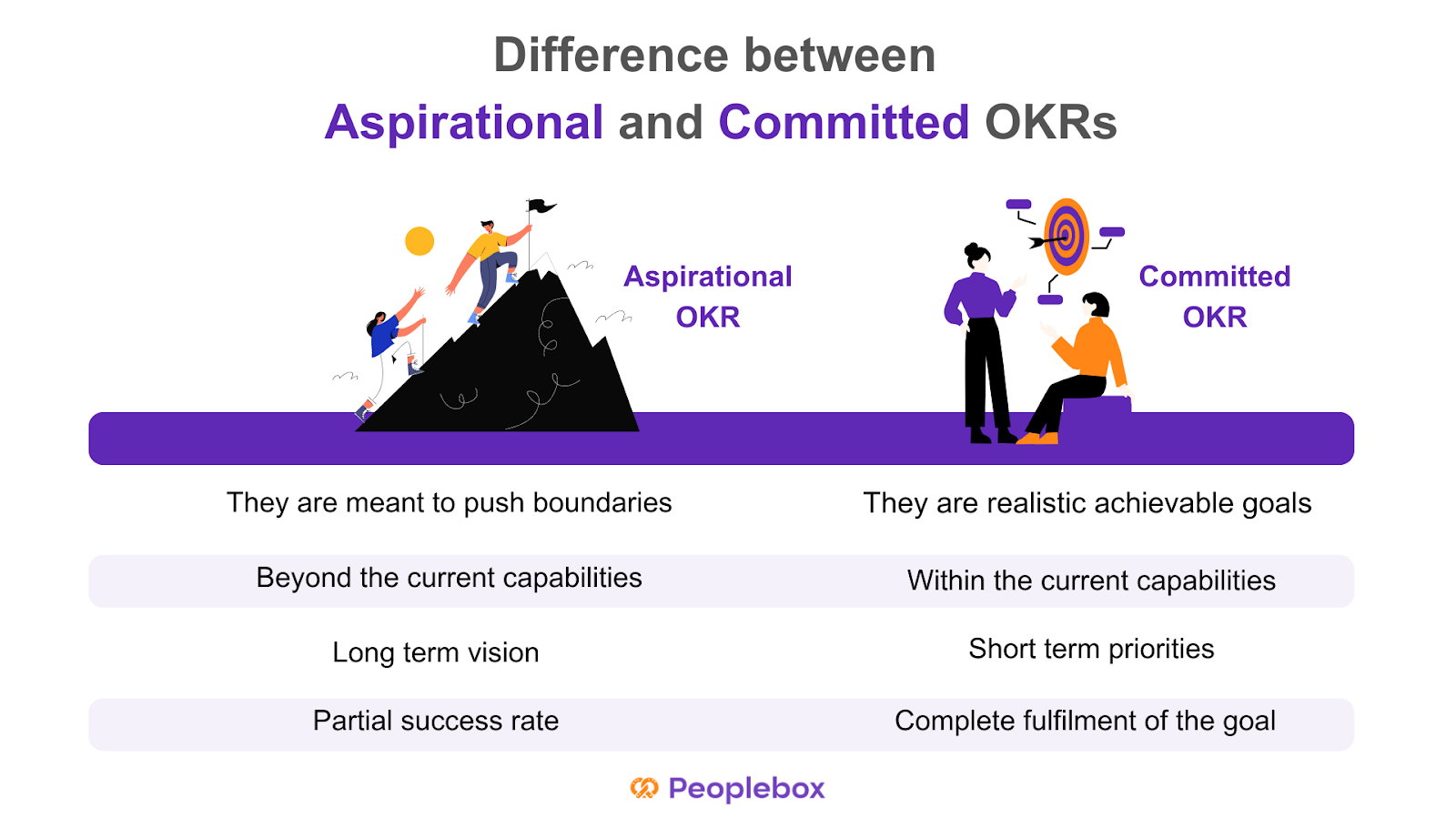
Aspirational OKRs are meant to push the boundaries and encourage employees to achieve visionary objectives. Committed OKRs, on the other hand, focus on committed objectives that offer a more realistic vision of goals with fully achievable results.
Aim
Committed OKRs help companies achieve their goals through individual and team achievements. Aspirational OKRs are often beyond the current capacities of the organization but help in pushing boundaries.
Timeframe
Aspirational OKRs are usually created to focus on long-term strategic vision while Committed OKRs offer short-term operational priorities to guarantee progress in the short term.
Committed OKRs are supposed to have a 100% success rate as each key result comprises fully achievable targets. Aspirational OKRs are usually found to have a success rate of 60-70%.
Committed and Aspirational OKR examples
The difference between committed and aspirational OKRs is subtle. Committed objectives are meant to be fully achievable, requiring teams to concentrate on straightforward priorities without taking unnecessary risks, ultimately serving as motivational tools to foster small wins and consistent progress.
A standard example in the sales team scenario might be like:
Committed OKR
O: Expand to the US market
KR1: Close first 6 start-ups
KR2: Get a meeting-to-close rate of 6%
KR3: Reach average deal size of $200
Aspirational OKR
O: Capture the entire US market in one quarter
KR1: Get onboard 95% of big customers in the US market to grow over competitors
KR2: Get a meeting-to-close rate of 30%
KR3: Reach average deal size of $2000
In the managerial team, these OKRs can manifest like such:
Committed OKR
O: Improve customer satisfaction with the existing solutions
KR1: Increase customer satisfaction score (CSAT) from 85% to 90% by the end of the quarter.
KR2: Reduce average response time from 15 minutes to 10 minutes within the next three months.
KR3: Train 100% of the support team on the new customer service tools within six weeks.
Aspirational OKR
O: Become the market leader in AI-powered customer service solutions.
KR1: Achieve a 30% market share in the AI customer service industry by the end of next year.
KR2: Launch three groundbreaking AI features that no competitor currently offers within 18 months.
KR3: Secure a partnership with at least two top-tier companies by the end of next year.
In a tech context, OKRs like these can come up:
Committed OKR
O: Improve the performance of the app and reliability
KR1: Reduce app crash rate from 2.5% to under 1% within the next quarter.
KR2: Decrease page load times by 30% in six months.
KR3: Fix 100% of the top ten reported bugs within the next two sprints.
Aspirational OKR
O: Revolutionize the user experience of our mobile app.
KR1: Increase daily active users (DAU) by 100% within 12 months.
KR2: Develop and launch a fully AI-driven recommendation system that personalizes the user experience by the end of the year.
KR3: Achieve a 4.8+ rating across app stores by introducing five innovative features within the next 18 months.
How to decide between Committed OKRs and Aspirational OKRs?
Committed OKRs will work best if your organization is newly introduced to the framework or is still in the rolling-out phase.
With each goal achieved, your team’s motivation and engagement will rise higher. In addition, teams easily get into the habit of running Committed OKRs and make it part of their work culture.
But if you have already used the framework in the past, aspirational OKRs can do wonders for you.
Creating a result-driven work culture takes time. It demands discipline, continuous effort, and a mindset shift of employees and management. So you should start simple and focus on learning the methodology first. And set up the necessary processes to make it work.
Setting aspirational OKRs in the very beginning would make your teams feel overwhelmed and over-pressurized. Extremely ambitious Key Results soon become too much to handle. Learning a new methodology takes time. Once your teams are used to the framework and it becomes a part of their work-life, you can consider aspirational OKRs.
With the later process, you can have objectives and a combination of committed and aspirational key results. While some key results will be easier to achieve, others will aim higher. Understanding the distinction between aspirational and committed goals is crucial for better goal-setting and team motivation.
Choosing the Right Type of OKRs
Choosing the right type of OKRs depends on the organization’s goals, culture, and priorities. Committed OKRs are suitable for organizations that need to achieve specific, measurable outcomes within a set timeframe. They are ideal for teams that require a clear direction and a sense of accountability. Aspirational OKRs, on the other hand, are suitable for organizations that want to drive innovation, creativity, and excellence. They are ideal for teams that want to push the boundaries and strive for something bigger.
When choosing between Committed and Aspirational OKRs, consider the following factors:
What are the organization’s goals and priorities?
What type of culture do we want to foster?
What kind of outcomes do we want to achieve?
What level of risk are we willing to take?
By considering these factors, organizations can choose the right type of OKRs that align with their goals, culture, and priorities. Whether you opt for committed or aspirational OKRs, the key is to ensure that they are aligned with your company aims and internal communication processes, fostering a balanced approach to achieving both immediate and long-term objectives.
How to balance Committed and Aspirational OKRs?
There is no one-size-fits-all answer, but where OKRs are aligned with company strategy, teams are well educated, open communication exists, and performance is reviewed regularly, it will help keep the balance between aspirational and committed OKRs intact.
However, the first step in finding equilibrium between the two forms of OKRs is that there has to be a knowledge of the difference. It needs to be apparent from the outset that everyone involved makes it clear the distinction between the two OKRs.
Teams and employees may have suitable insights that will assist in determining what is realistically achievable (committed) and what is a stretch but possible (aspirational). This can help determine what the balance ratio for the OKRs is going to be.
A very critical element to succeed with OKRs is reviewing and tracking the progress. With weekly check-ins, teams can go through their OKRs regularly and update the same performance data. It becomes easy to track how they have progressed on the outcome of the OKR in the OKR review process.
The grading of OKRs is very clear on the distinction between committed and aspirational goals. Committed OKRs are things to be accomplished within the cycle, and grading is binary: pass or fail. That is, an OKR is said to be successful if 100% of it is accomplished; otherwise, it is regarded as a failure. Aspirational OKRs, on the other hand, are graded along a more nuanced scale.
Common mistakes to avoid while setting up Aspirational OKRs
Here are 6 common mistakes organizations commit while setting up aspirational OKRs-
1️⃣Ignoring organizational structure and needs
A common mistake most organizations commit while writing aspirational OKRs is to write something like, “What can be done more if we have extra resources and luck favors us ?” Instead, you can pretend to be a genie and strive to understand “What our customer needs at present moment?”
2️⃣Unrealistic aspirational OKRs
Aspirational OKRs don’t imply setting unrealistic goals. It should be achievable, with the understanding that your teams won’t have any clue about how to achieve these OKRs. Aspirational OKRs demand overuse of resources. They are fluid and flexible. But still helps your teams focus on well-defined goals.
3️⃣Writing a low-value objective (LVO)
Moving forward with a “Who cares?” attitude is a common pitfall among organizations. Low-value objectives go unnoticed even after the successful completion of the key results.
4️⃣OKRs should be framed to gain tangible benefit
OKRs are a tool for organizations to work for big goals in the long run by breaking them into small chunks that can be achieved within a shorter cycle.
5️⃣A committed OKR must deliver a 1.0
It makes the framework stiff and doesn’t leave scope for improvement.
6️⃣Too many OKRs
How many aspirational OKRs you should set for one cycle will depend on your company’s resources. But never aim for too many Objectives and key results. As it can easily divert your focus altogether.
Best Practices for Implementing OKRs
Implementing OKRs requires a structured approach to ensure success. Here are some best practices to consider:
Align OKRs with company goals: Ensure that OKRs align with the organization’s overall goals and priorities.
Make OKRs specific and measurable: Ensure that OKRs are specific, measurable, achievable, relevant, and time-bound (SMART).
Set ambitious yet achievable goals: Set goals that are challenging yet achievable, and provide a clear direction for the team.
Establish clear key results: Establish clear key results that indicate progress towards achieving the objective.
Track progress regularly: Track progress regularly and provide feedback to teams and individuals.
Foster a culture of transparency and accountability: Foster a culture of transparency and accountability, where teams and individuals are held accountable for their progress.
Provide training and support: Provide training and support to teams and individuals to ensure they understand the OKR framework and how to use it effectively.
Review and adjust OKRs regularly: Review and adjust OKRs regularly to ensure they remain relevant and aligned with the organization’s goals.
By following these best practices, organizations can implement OKRs effectively and achieve their goals. Regularly reviewing and adjusting OKRs ensures that they stay aligned with the evolving needs of the organization, helping teams to maintain focus and drive continuous improvement.
Conclusion
Now that you know the difference between committed and aspirational OKRs and how they can impact your organization’s success, it’s the decision time. Choose the one that will best suit your purpose.
And don’t forget it’s a trial and error method. Have regular OKR check-ins and reviews. Collect feedback during and after each cycle. And use your learnings to avoid further mistakes in the next OKR cycle.
Pooja Pooja
Quarterly OKRs: 5 Tips for Successful Wrap-Up
Imagine a scene! the quarter is about to end and it’s time to review and wrap up quarterly OKRs.
The clock’s ticking. Everyone is in a rush. And you are busy evaluating which goals are yet to be achieved. And what has already been done. It’s also time to think about your priorities for the next quarter.
There are so many checklists and questions going in your head.
Have my teams found ways of closing out quarterly OKRs? Will my teams beat the clock and tick all the boxes? Have they reflected on their OKR progress? How will I deal with this end-of-quarter OKRs rush?
Feeling overwhelmed!!
Here is a step by step guide to help you prepare best to wrap up your quarterly OKRs–
Before you start to review and wrap up quarterly OKRs- remember that wrapping up quarterly OKRs is teamwork. And to see the best results every team irrespective of their department have to come together.
Track your team’s OKR progress and gather the key results scores. You can score your OKRs on a scale of 1 to 10 on the basis of how far the objectives have been achieved.
This will help you evaluate your progress in a truly data-driven manner.
If the scores are low this might suggest that your OKRs were unrealistic. On the other hand, if the score is too high it may suggest that your OKRs were not ambitious enough.
Whatever learning you made from this process. It will help you to form the basis for designing your next set of quarterly OKRs.
Make sure everyone is up to date
It is important to ensure that your teams have clarity about their OKR status. At the same time, they have visibility into what other teams have been doing. It can be achieved through regular check-ins with your teams. Check this ebook on OKR handbook.
This step will help you check if your teams are aligned or not. When everyone in your team is on the same page taking decisions based on priorities becomes easy. As you have the data in hand to rely on instead of guessing.
Organize OKR check-ins
The importance of check-ins for OKR success cannot be emphasized enough. OKR check-ins provide you an opportunity to have 1 on 1 discussion in all OKR matters.
With OKR check-ins you can discuss with your leaders and team members about – what went well, what didn’t work for them, what needs to be dealt with immediately, what problems they are facing etc. at an individual as well as team level.
OKR check-ins will help you understand what’s holding teams back. You will further get the chance to push priorities that might have shifted midway.
Dig into opportunities
Organize Quarterly OKRs review meetings to dig into opportunities. During these meetings, go through each key result with your teams. Find out what went well and what needs to be done better.
Let the OKR leaders from each team present their learnings and achievements before everyone. Here teams can give a small presentation highlighting the most important lessons with context.
So that other teams can benefit from their learnings and experiences. And use them in designing their OKRs for the next quarter.
If you are a large-scale company working with multiple departments. The OKR review meetings can be held at the departmental level.
Plan the future
Now that you have gathered the data and matrix you need through OKR check-ins and OKR review meetings. It’s high time to plan for the next quarter.
OKRs have the power to build the future of your organization. But OKR failures can cost you a fortune.
Hence it’s important to find out the core reasons behind your OKR success or failure for the present quarter. And use it as context while designing OKRs for the next quarter.
[elementor-template id=”89725″]
Do you need to plan new OKRs every quarter?
“Should OKRs change every quarter?” is a question often left unanswered.
Even after an OKR is achieved, you can roll it forward for the next quarter if necessary.
For example, if your OKR was to increase customer satisfaction by 20% in the present quarter. This could be relevant even for the next few quarters.
In case, of missed OKRs, you need to take a call. And decide whether you want to carry it forward or set new OKRs based on the data gathered.
When should you review and wrap up Quarterly OKRs
You should preferably wrap up the quarterly OKRs at least a week prior to the beginning of the next quarter.
But the preparation and discussions for the next quarter should be initiated almost a month before the new quarter begins. This is because designing OKRs takes dedication, time, and effort.
Bonus Tips:
Maintain Transparency from day one. Keep data transparent so that everyone knows how it’s going.
Create a culture of critical feedback. Be honest when it comes to feedback. At the same time be open to getting feedback from your teams as well.
Celebrate wins– even the smallest ones. Recognize your teams for their achievements more often.
Over-communicate. Communication is the key when it comes to wrapping up quarterly OKRs.
Take a moment
Wrapping up end-of-quarter OKRs will allow you to pause and take a moment to think. It provides you time to reflect on your wins, failures, and setbacks. It’s a stitch in time to make sure that your OKR framework is a success.
Follow the steps given to close out quarterly OKRs and make the most out of the process.