It’s not new: that brilliant developer who got filtered out because they wrote “full stack” instead of “full-stack.” Ouch.
Your ATS should make hiring easier. Instead, you’re missing great candidates and barely using what you’ve already paid for. Meanwhile, other teams are filling roles faster and landing better talent. Their secret? They’ve figured out how to make the ATS work smarter.
Join the league because in this guide, you’ll discover:
How to pick an ATS that fits your team’s real needs
Hidden features you already have (but never knew about)
Proven tricks to speed up your hiring
Which new tech actually matters (and what’s just hype)
What Exactly Is an ATS? (And Why Does Everyone Keep Talking About It?)
Remember when hiring meant your desk disappearing under mountains of paper resumes? (If you don’t, count yourself lucky!) Let’s talk about the days before ATS became every recruiter’s best friend.
The ATS Basics: How It All Began and Why It Matters
⬆️ It’s 1995, and your morning starts with 300 paper resumes hitting your desk. By lunch, you’ve got paper cuts, eye strain, and that sinking feeling you might have missed someone great in the pile. That was the recruiting process before ATS came along.
⬆️ The story starts in the 70s when the first ATS systems showed up. They handled data entry, simple tracking, nothing fancy. but they started something big. Only the corporate giants could afford them back then.
⬆️ The 80s spiced things up with resume parsing (finally, a machine could read resumes!), but these systems were still clunky and expensive.
⬆️ Then, the 90s internet boom happened. Suddenly, multiple job boards like Monster and CareerBuilder popped up, and companies needed better ways to handle the flood of online applications.
➡️ Today, cloud tech has brought in a whole new game. Even small companies can afford an ATS, job seekers can apply from their phones, and the systems do everything from social media integration to analyzing your recruitment metrics.
What Does an Applicant Tracking System (ATS) Actually Do?
An Applicant Tracking System (ATS) is a specialized HR recruiting software that manages your entire recruitment process, from posting job openings to making offers. But calling it just “tracking software” is like calling your smartphone just a “calling device”; it does so much more.
It’s like your hiring team’s personal assistant and the digital brain that:
Keeps every application organized and searchable (goodbye, messy email inbox!)
Scans resume for specific skills and experience you need
Flags the most promising candidates based on your job requirements
Tracks where each candidate is in your hiring pipeline
Handles the mundane stuff like sending out those “thanks for applying” emails
Makes sure you don’t lose track of great candidates in the shuffle
It connects all the dots in your hiring process. Post a job title once, and it’s everywhere you want it to be. Applications flow in, get screened automatically, and land in front of the right people. Need to schedule interviews? Track feedback? Send offers? It’s all there.
What ATS is not: An ATS isn’t a CRM (Candidate Relationship Management) system. While both handle recruitment, they serve different needs. ATS manages active job applications and current hiring (the people who’ve already hit “apply.”) CRM is about building relationships with potential candidates who haven’t applied yet. Your ATS handles everyone in your current hiring pipeline. CRM tools build connections with passive candidates you might want to hire six months from now. Many teams use both: ATS for active hiring and CRM for long-term talent planning.
Who Benefits Most from an ATS?
The short answer? Not just the big players anymore.
Staffing agencies run the show with ATS. They’re handling hundreds of roles across industries, matching candidates fast, and keeping clients happy. One system tracks everything, from initial contact to placement success rates.
Government organizations need ATS for transparency. Public sector hiring comes with strict compliance rules, diverse candidate pools, and multiple approval stages. Top Applicant Tracking Systems keeps everything documented and audit-ready.
Mid-sized companies are seeing the biggest wins. When you’re scaling from 20 to 200 people, spreadsheets break down fast. These teams use ATS to punch above their weight, competing for talent against bigger companies while keeping hiring costs low.
Nonprofits face unique challenges. They’re often juggling both paid staff and volunteer applications, working with tight budgets, and needing to move quickly when grant funding comes through. ATS helps them do more with less.
ATS vs. Traditional Hiring: What’s the Big Deal?
Traditional hiring burns 23 hours per hire on average, just pushing papers and sending emails. That’s nearly three full workdays you could spend actually talking to job candidates.
Manual hiring feels cheap until you do the math. Free email and spreadsheets? Sure. But factor in the hidden costs: missed applications, scheduling mix-ups, compliance risks, and valuable candidates dropping out because you took too long to respond.
But here’s what really happens in traditional hiring:
Your talent acquisition team posts jobs across multiple platforms then juggles emails and attachments from each source
Every resume needs individual downloading, reading, and sorting
Someone has to manually type candidate info into spreadsheets
Every update means more emails, calls, and calendar coordination
Paper trails get messy when you need to check why you picked one candidate over another
The best Applicant Tracking Systems change this workflow by:
Creating a central hub for all applications
Automatically parsing resumes based on set requirements
Simplifying interview scheduling through integrated calendars
Sending automated updates to keep candidates informed
Making every application searchable and trackable
How an ATS Changes the Hiring Game
Let’s get real about recruitment in 2025. When 75-88% of applications don’t match what you need, and top talent vanishes from the market in 10 days, you need more than just another tool. You need a complete reset of how hiring works.
From Chaos to Control: Why ATS is a Recruiter’s Best Friend
86.1% of teams hire faster with ATS. But speed is just part of the story. The real win? What happens when you free your recruiters from admin work?
Centralized Control
Most teams bounce between emails, sheets, and notes all day. ATS puts every resume, conversation, team feedback, and candidate interaction in one spot. Switch between applications, compare candidates side by side, and update statuses without hassles.
No more “Did you see that developer’s application?” “Which inbox was it in?” drama. Everything’s right where you need it.
Time-Saving Automation
An ATS costs $100-150 per user monthly, compared to $2,000-3,000 for a recruiter. Beyond costs, most recruiters land better talent after the switch. Why? The system handles the grunt work: posting jobs across multiple platforms, screening initial applications, and sending bulk updates.
Your team can finally focus on what computers can’t do: building relationships with top candidates.
Candidate Insights
Remember the last time your team had different opinions about a candidate? ATS changes that. Every team member leaves structured feedback, ratings, and notes that everyone can see. Skip the “I thought you liked that candidate” moments. Calendar integrations eliminate scheduling headaches. Most importantly, you’re making decisions based on clear data, not just hunches.
Everyone sees the same information, so there are no conflicting candidate assessments or missed red flags.
Making Data Work for You
Tracking random metrics? Your ATS holds much more.
Hiring sources that matter: Most companies blow their recruiting budget on Indeed and LinkedIn because everyone else does. But, your ATS might show your best engineers come from that niche Discord community, or your top sales force comes from employee referrals. Suddenly, you know exactly where to double down and what to drop.
Real process bottlenecks: When roles stay open too long, everyone blames the competitive job market. Your ATS tells the real story. That “efficient” 6-stage interview process actually loses 60% of candidates. Or that one department’s roles stay open twice as long because they ghost candidates for weeks.
Team performance insights: Your ATS tracks every step of the candidate’s journey, from the first click to the final offer. You’ll see which interviews predict success, which teams close candidates fastest, and where top talent drops off. And yes, you’ll finally know if that fancy new job board subscription is worth keeping.
And every insight leads to action. Because data without decisions is just noise.
Choosing the Right ATS: What to Look For and How to Decide
Most HR teams chase features and end up with a system that looks great on paper but creates more problems than it solves. The key? Start with your hiring pain points, not a feature wishlist.
1. What Makes an ATS “Right” for You?
Start with addressing your pain points and then prioritize features that align with them.
Struggling to identify specialized talent? Focus on ATSs with advanced candidate sourcing capabilities and Chrome extensions for LinkedIn and industry job boards.
Managing global teams? Prioritize multi-language support and timezone-smart scheduling.
A retail chain planning 20 new locations needs different capabilities than a tech firm focusing on specialized senior hires. Factor in your 12-24-month hiring forecasts. Your ATS should grow with you without charging for features you won’t use for years.
Signs your ATS needs an upgrade:
⚠️Your team copy-pastes candidate info between systems ⚠️Hiring managers ask, “What happened to that candidate from last week?” ⚠️ You’re paying for three tools that should be handled by one ⚠️Your talent pool is full, l but searching it takes forever
2. Questions to Ask Before You Commit
These five questions dig into what makes ATS software truly work for your team, from the stuff vendors don’t mention in demos to the hidden gotchas that surface after you’ve signed the contract.
❓Does It Integrate With Your Current Tools?
Your ATS should connect with your existing HR tools, payroll system, and background check platforms. Why? Because manual data entry is the quickest way to kill efficiency and create errors. Look for:
Pre-built integrations with major HRIS and payroll providers
API access for custom connections
Real-time data syncing (not just daily uploads)
Email or Slack integration for feedback
❓How Easy Is It To Use For Recruiters And Hiring Managers?
The best ATS is the one people actually use. Period. Complex workflows and confusing interfaces lead to workarounds and shortcuts that defeat the whole purpose. Your hiring managers already have full plates; they need simplicity, not a new technical challenge. Check for:
One-click access to candidate profiles
Mobile-friendly interfaces for on-the-go reviews
Clear documentation for IT teams
Intuitive dashboard design
❓What Reporting And Analytics Features Does It Offer?
Your ATS should tell stories about your recruitment success, not just spit-out spreadsheets. Good reporting helps you spot problems early and decide where to invest your recruiting budget. Popular Applicant Tracking Systems track:
Source quality metrics by job board
Time-to-fill trends by department
Candidate drop-off analysis
Cost-per-hire tracking
Custom report builders for leadership requests
❓Is It Really Secure?
Your ATS handles sensitive candidate data, everything from social security numbers to salary history. One security breach can damage both your reputation and bottom line. Security features should be robust and transparent. Verify:
SSL protection for all interactions
Regular security audits
Clear data backup protocols
Compliance standards
❓How’s The Customer Support?
Even the best systems hit snags. What matters is how quickly you can get back on track. Here, support quality often makes the difference between minor hiccups and major disruptions. Check for:
Live chat availability
Training programs
Implementation support
Regular system updates
3. Balancing Budget with Features
Oh, let’s not forget the budget. A truth about ATS pricing that vendors don’t advertise: the most expensive option isn’t always your best bet.
Some teams pay premium prices for fancy features they’ll never touch, while others try saving money with basic plans that end up costing more in workarounds and lost time. Here’s what actually drives ATS costs:
Number of open roles (affects per-job pricing)
Size of your recruiting team (impacts user licenses)
Employee count (determines per-employee pricing)
Integration needs (each connection costs extra)
Data storage (more candidates = higher costs)
Let’s break down what really matters:
✔ Monthly or annual?: Annual contracts look tempting with their 15-20% discounts. But first, calculate your actual hiring volume. If you’re mostly hiring seasonally or in spurts, monthly plans give you the flexibility to scale up and down. Plus, you’re not locked into a system that might not fit next year’s needs.
✔ Setup fee conversation: Those implementation fees ranging from $1000-$5000? They’re actually negotiable. But if you’re willing to handle the data migration and initial setup yourself, many will waive these fees entirely.
✔ Core features vs premium add-ons: Skip the endless feature comparison charts. Focus on these deal-breakers:
Resume parsing accuracy (the difference between 85% and 98% accuracy saves hours of manual fixes)
Calendar integration (because email tag with candidates kills productivity)
Custom workflow builder (your hiring process shouldn’t bend to fit your ATS)
Mobile access (crucial for hiring managers who need to review on the go)
Everything else? Nice to have, but not worth premium pricing unless you’re hiring thousands monthly.
✔ Budget-friendly alternatives: Some teams split their investment between a basic ATS and specialized tools for specific needs. A simple ATS paired with a great screening tool often delivers better results than an expensive all-in-one solution that does everything adequately but nothing exceptionally.
Is Your ATS Ready for the AI Era?
Will Artificial Intelligence replace ATS?
The short answer: No. The correct answer: AI and ATS are better together.
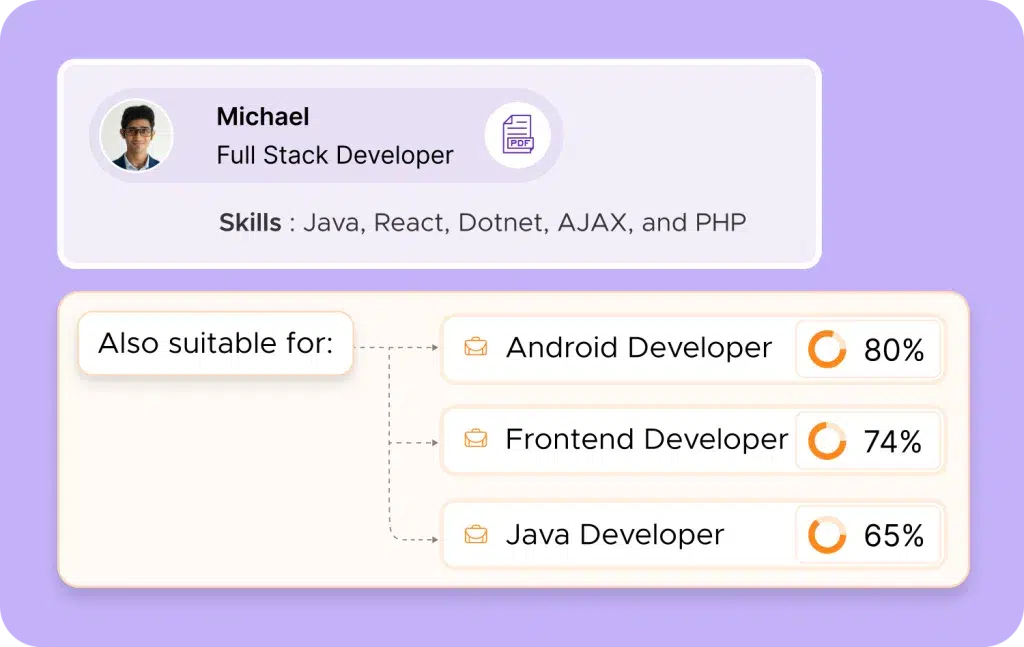
AI works alongside your ATS to find qualified candidates that standard filters miss. Take that software engineer who never mentioned “cloud architecture” in his resume but built three successful AWS deployments. Or the content strategist whose portfolio shows SEO expertise without using the exact keywords in your job description.
Let’s break it down for you.
Why Your ATS Needs AI
Remember spending hours scanning resumes for “5 years of experience” only to miss qualified candidates who wrote “half decade” instead? That’s where AI benefits your application tracking.
Modern AI tools read resumes like a seasoned recruiter would. They catch context, understand skill relationships, and connect dots that basic keyword matching misses.
For example, a marketing manager who “drove 140% growth in user acquisition” might not mention “growth marketing” explicitly, but AI gets it.
And look at what happens during resume screening. Traditional ATS might rank candidates based on keyword matches. But AI analyzes success patterns from your past hires, learns what actually predicts job performance, and applies those insights to new candidates.
Some practical wins when your ATS has AI backup:
Spotting transferable skills (like that sales rep who’d make a killer customer success manager)
Catching qualified candidates who describe their experience differently
Predicting which candidates are most likely to accept offers based on past hiring data
Finding hidden gems in your existing talent pool who’ve gained relevant skills
But here’s what matters the most: AI tools reduce those subtle biases that creep into hiring. They focus on capabilities, not fancy degrees or brand-name employers. AI helps evaluate candidates based on actual capabilities rather than keyword matching. This means you find qualified people who might not fit the standard template, bringing fresh perspectives and diverse talent to your team.
Tools Like Peoplebox.ai Take Your ATS to the Next Level
Peoplebox.ai adds smart matching to your existing ATS. It scans applications across every open role, finding qualified candidates you might have missed. So when that product manager applies for a project role, the system spots their analytics background that’s perfect for your data team opening.
The platform’s stand-apart function is analyzing resumes more comprehensively than standard ATS keyword matching. Key features that matter:
Cross-role matching (spots qualified candidates for positions they didn’t apply to)
Automated skill tagging (creates a searchable database of reviewed candidates)
Direct integration with your current ATS (keeps your workflow unchanged)
Public domain insights (uncover candidate achievements beyond their resume)
Continuous talent pool updates (with fresh matches for your company profile)
You’ll spend less time on admin tasks and more time connecting with promising candidates. Your existing ATS keeps running as usual, Peoplebox.ai just makes it more effective.
For hiring managers, this means shorter time-to-fill, better candidate matches, and a pipeline of qualified talent ready when you need it.
Are You Getting the Most Out of Your ATS?
Most teams use just 50% of their ATS features. Meanwhile, they’re spending hours on recruitment tasks their system could handle automatically.
To understand how to use the remaining 50% of the ATS features, you need to know how not to use it.
Common Mistakes (And How to Avoid Them)
Most HR teams barely scratch the surface of their ATS capabilities. Here are the mistakes costing you time and talent:
❌ Ghosting Your Talent Pool
That developer who almost made the cut last quarter? They might be perfect for your new job openings. But your candidate database is probably a mess of outdated profiles and lost opportunities.
Quick fix: Clean up your talent pool monthly. Tag candidates by skills and expertise. Add notes about standout qualities from past interviews. When a new role opens, you’ll have pre-vetted candidates ready instead of starting from scratch.
❌ Going Blind With Analytics
Your ATS tracks everything from application completion rates to source effectiveness. But checking time-to-fill stats once a quarter isn’t analytics; it’s barely scratching the surface.
Quick fix: Deep dive into your hiring funnel metrics. Track which sources bring quality candidates, not just quantity. Monitor completion rates on your application forms. These insights tell you where to invest your recruiting budget and what parts of your process need work.
❌ Missing Important Integrations
When your ATS doesn’t work well with your assessment tools or interview platforms, you’re creating extra work and risking errors. Each manual data transfer is a chance for something to slip through the cracks.
Quick fix: Start with essential integrations: your video interview platform, skills assessment tools, and background check system. Each connection cuts manual work and keeps candidate data flowing smoothly.
❌ Over-Automating Everything
Yes, automation saves time. But when every candidate interaction comes from a robot, you’re losing the human element that top talent craves.
Quick fix: Use automation strategically. Keep initial application responses and interview scheduling automated. But personalize your communication for promising candidates and key hiring stages. Take time to give real feedback, especially to candidates you want to keep warm for future positions.
❌ Skipping Regular System Audits
Your hiring needs to evolve. If you haven’t updated your ATS settings since implementation, you’re probably working with outdated workflows and irrelevant filters.
Quick fix: Audit your system quarterly. Review your job posting templates, email sequences, and screening filters. Update them based on hiring manager feedback and changing role requirements. Small tweaks prevent major headaches.
❌ Skipping Team Training
Your ATS can screen resumes in seconds, but if your team doesn’t know how to set up proper filters, you’re still reading every application manually. Or worse, missing great candidates because the filters are wrong.
Quick fix: Run monthly training sessions. Cover one feature at a time, from basic filters to advanced Boolean search. Get your team to practice with real scenarios. When everyone knows the tools, your hiring speed doubles.
How to set up job templates that actually work
Most job templates fail because they’re either too rigid or too vague. Here’s how to build ones your team will actually use:
✔ Start with the deal-breakers. List 4-5 absolute must-haves for the role. For a software developer, that’s specific coding languages and years of hands-on experience. For sales, it’s revenue targets and market expertise. Skip the generic stuff like “team player” or “excellent communication.”
✔ Build flexibility into your requirements. Instead of “5+ years of JavaScript,” try “3-7 years of JavaScript or TypeScript.” You’ll catch qualified candidates who might interpret requirements differently.
✔ Test your template before going live. Run 10 resumes from your successful past hires through it. If your top performers wouldn’t make it through your new template, you need to adjust those filters.
✔ Keep your screening questions short. Three deal-breaker questions beat 15 nice-to-haves. Long forms kill application rates, especially from senior candidates who know their worth.
✔ Update templates quarterly. Technologies change, skill requirements shift, and market demands evolve. What worked six months ago might be filtering out your ideal candidates today.
Measuring ROI: Is Your ATS Worth It?
Think bad hires cost money? Try calculating the hours your team wastes on manual screening and interview scheduling. Your ATS investment pays off in ways you might not expect.
Bad hire prevention
Each wrong hire costs roughly 30% of their first-year salary. Do the math: For a $55,000 role, that’s $16,500 down the drain. A good ATS helps spot red flags early through structured assessments and consistent evaluations.
Time recovery
Map out your current efficient hiring process. Count the hours spent on:
Manual resume screening
Back-and-forth interview scheduling
Copying candidate data between systems
Chasing hiring manager feedback
An ATS automates these tasks. For a team of three recruiters, that’s like adding half a recruiter to your team without the extra salary.
Revenue impact
Every open position costs more than you think. Say your mid-sized company ($5.2M revenue, 85 employees) loses $277 daily per empty seat. With 20 planned hires and 35-day fill times, that’s $193,900 slipping away. Cut just a week off your hiring time? You’re saving $38,780 yearly.
External cost reduction
Adding up job board subscriptions, agency fees, and third-party tools? An ATS with built-in sourcing and assessment features can slash these costs by 20% or more. That’s real money back in your budget.
The real ROI shows in better hires, faster fills, and a team focused on what matters (finding great talent, not pushing paper).
What’s Next for Hiring Technology? Exploring Beyond ATS
While most HR teams are just getting comfortable with ATS, the tech landscape is already shifting.
Blockchain is entering recruitment, bringing bank-level security to candidate data. When candidates share their Stanford degree or AWS certification, blockchain creates an encrypted, tamper-proof record. HR teams can instantly confirm candidates’ qualifications without the back-and-forth with universities or previous employers.
Some companies now let candidates tour offices virtually before accepting offers. Others use VR for skill assessments, creating interactive challenges that reveal how someone actually works. Remote teams run VR interviews that feel more personal than video calls. The best part? VR spots communication skills and problem-solving abilities that traditional interviews often miss.
Companies now customize their entire recruitment workflow to match their hiring style. Through API connections, your recruitment tools work together: background checks, onboarding systems, everything syncs automatically. AI analyzes your hiring data and suggests personalized improvements. Even candidate interactions get customized, from assessment paths to communication style.
Preparing for the Future
Smart companies are already using AI to make real improvements in how they spot and secure talent. Basic screening tools aren’t enough anymore; successful teams are using integrated systems that learn from every hire.
When a new engineer crushes their first project, or a sales rep breaks records, the AI notes those patterns. Next time similar talent comes along, you’ll know.
For hiring teams, this means focusing on what matters. No more debating whether someone has the right technical skills — AI handles that verification. Instead, you’re asking better questions:
How does this person solve problems?
What unique perspectives do they bring?
Will they push our team to grow?
This is where Peoplebox.ai makes the difference. While other tools stop at screening, we’re building the bridge to smarter hiring decisions. Our AI works alongside your ATS to spot talent signals you might otherwise miss.
Why Peoplebox.ai Is the AI Upgrade Your ATS Needs
Your ATS needs an upgrade. Not because it’s broken but because you’re missing opportunities to hire faster and better. Here’s how Peoplebox transforms your hiring and beyond:
✅ Screen candidates like your best recruiter: Takes 90% of the grunt work out of screening by scanning every resume like your best recruiter would. Peoplebox’s AI Resume Screening checks experience, skills, and achievements against your exact needs.
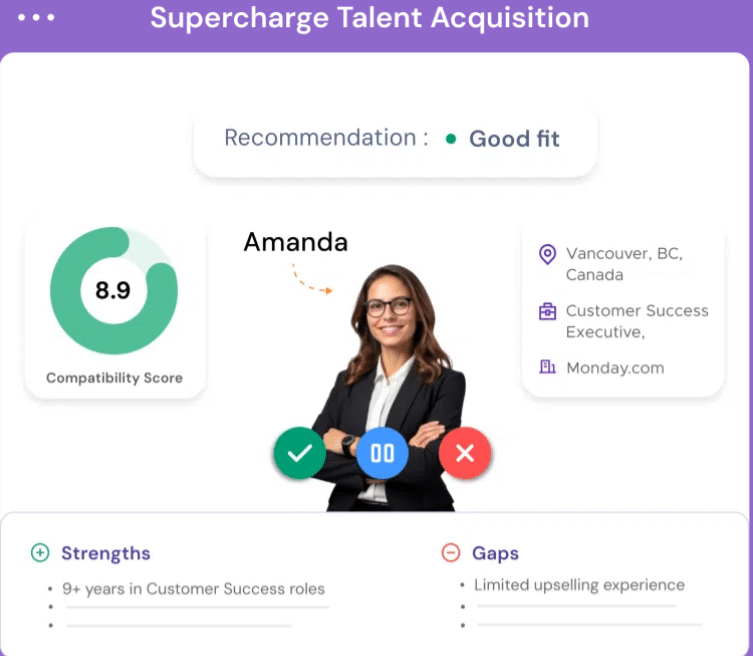
✅ Stop guessing, start scoring: Rank each candidate on skills, experience, and potential cultural fit. Shows you their strengths and gaps clearly, so you know exactly who deserves that first call.
✅ Keep your tools in sync: Connects seamlessly with HR systems like Darwinbox, BambooHR, and Zoho People. Keep all your candidate data in one place.
✅ Handle applications like a pro: Screening thousands of resumes? No problem. Each one gets tagged, organized, and matched against every open role you have.
✅ Give everyone a fair shot: Focuses purely on qualifications and experience. Gives every candidate a fair shot by removing unconscious bias from initial screening.
✅ Never lose great talent: Keeps track of everyone who’s applied before. When new roles open up, it instantly shows you who from your past job applicants might fit.
✅ Keep your database fresh: Updates old candidate profiles with their latest skills and achievements. Pulls in public data about their projects and certifications.
And once they’re hired? That’s when Peoplebox really shines. From goal-setting to performance management, we keep your internal talent growing. Teams see 30% higher engagement in goal and review adoption.
600+ organizations trust this system, and teams see 90% less time spent on applicant review.
Ready to Make Your ATS Work for You?
We both know your ATS could work better. You’ve seen how other teams fill roles in half the time, land better candidates, and enjoy their recruitment process. The difference isn’t fancy features or bigger budgets; it’s knowing how to make your tools work for you.
Take stock of your current setup. Which tasks still eat up your day? Where do great candidates slip through? Start there. Pick one process to optimize this week. Maybe it’s cleaning up that candidate database or setting up those email templates you’ve meant to create.
Need a hand figuring out your next move? Our team helps HR leaders build hiring systems that work. Book a demo with Peoplebox, and we’ll walk you through your current process and show you exactly where to make impactful changes.
FAQs
How do I know if my ATS is the right fit for my team?
To know if your Applicant tracking system fits your team well, you just need to see your system addresses a few key questions: Does it match your hiring volume? Can your team find what they need in 2-3 clicks? Do hiring managers actually use it, or do they email you instead? And most importantly, does it connect with your other HR tools without creating extra work?
What are the best ways to optimize an ATS to reduce hiring time?
Use talent pools properly, and tag candidates with skills and roles they’d fit. Set up automated status updates. Build a scoring system that actually works for your roles. And please, clean up those ancient candidate profiles. Old data slows everything down.
How does Peoplebox.ai integrate with my current ATS?
Peoplebox plugs right into your existing setup with no disruption to your workflow. Your team keeps using the same ATS interface, and the platform works in the background, enhancing your screening and matching capabilities. Plus, Peoplebox adds AI screening and smart matching in the background without extra logins or complicated setups needed.
What metrics should I track to measure the effectiveness of my ATS?
Beyond time-to-fill, watch your candidate response rates and offer acceptance ratio. Track how many interviews it takes to make a hire. Monitor drop-off points in your application process. These numbers tell you where your system needs tweaks.
How can I ensure that my ATS is delivering the best candidate experience?
Test your own application process seriously, and apply for one of your jobs. Track how long candidates wait between updates. Ask for feedback at each stage. Most importantly, check your automated messages and make sure they sound like a real person wrote them.
What stood out is the deep understanding of the Peoplebox.ai team and their willingness to listen & enhance the platform to scale with our long-term needs.
Khilan Haria
VP and Head of Payments Product, Razorpay
I'm glad that we partnered with Peoplebox.ai for our company-wide OKR rollout. Thanks to its simplicity, we achieved significant adoption within two quarters
Rohit Arumugam
Business Head, Nova Benefits
Since we started using Peoplebox.ai, we have been able to bring all of our leadership across the organization together and show them how all of our goals align
Jaclyn Hoover
Senior Director HR, Propel School
Driving the entire interface through slack is simply brilliant especially for a tech product company! There was zero time spent on training! It can not get easier than that!
Swapna Nair
VP - HR, Khatabook
I chose Peoplebox.ai because it had integrations with the tools we use for sales and engineering to automate updating of key results and sync projects
How to Roll Out OKRs for First Time: 7 Steps Startegy
How to Roll out OKRs for the first time is a question common among organizations just introducing OKRs.
Imagine a scenario-
You are rolling out OKR for the first time.
One thing goes wrong and… Boom!
Your employees are already hating the process- even before it took a pace.
You certainly wouldn’t want that to happen in your organization. OKRs can surcharge and accelerate your organizational growth. But the key is to get this done right.
That’s why a well-planned rollout is significant for the success of an OKR system.
Introduce the new goal-setting approach strategically but not in a mechanical process. Every organization is unique and can face unique challenges while implementing OKRs.
[elementor-template id=”89725″]
How to roll out OKRs: Here are 7 Best Practices for a successful OKR rollout
1 Communicate the OKR Methodology to all the teams
Get everyone in the organization on board with OKRs. Present the concept clearly and precisely. Educate everyone on the OKR language.
While some people will embrace the changes with open arms, there are also going to be some skeptics into the bargain. You must let them express their concerns and provide answers to their “why, how, and what?” questions.
Explain to them the benefits of implementing the OKR framework. Highlight how it’s going to impact the business and the individual success of the employees.
Organize workshops, training, discussions, introductory presentations, and seminars to help your employees’ design quality OKRs. Transparently explain to them the strategic execution, alignment, expectations, and tools they will be required to use for the purpose.
To help everyone speak the same language, document your company OKR framework
2 Inspire with success stories
List the names of reputed companies like Google, Netflix, Intel, LinkedIn, Twitter, etc. which have successfully implemented OKRs. Narrate their success stories to help them visualize how OKRs can cater to their individual success.
For example, OKRs helped LinkedIn become a 20 Billion Company. Jeff Weiner, CEO of LinkedIn, describes OKRs as, “something you want to accomplish over a specific period of time that leans toward a stretch goal rather than a stated plan.
It’s something where you want to create greater urgency, greater mindshare.”
You can either go for an organization-wide rollout Consider running an OKR Pilot first, depending on what fits you best.
If you have a culture that’s open to change and a flexible structure of functioning, an organization-wide rollout will work best for you. But it’s always best to take small steps. Start from one part and gradually move to others.
[elementor-template id=”89725″]
Crafting and implementing OKRs across the entire organization can seem overwhelming especially if you are a large organization. Instead, choose a particular part of the organization and run a pilot project.
“If you concentrate on small, manageable steps you can cross unimaginable distances.”
It’s also important to decide “how often?” will OKRs be reviewed. Will it be done quarterly or annually?
4 Go for the Top-down approach
A top-down approach to OKRs was the first pattern attempted. The top management has a significant role in setting the overall direction of the company. Starting from the top provides clarity for the rest of the organization.
“People buy into the leader before they buy into the vision.”
For example, you can start with the senior leadership team. Make them an example to roll out OKRs to the departmental heads. From there you can move on to team leaders, and to the rest of your teams.
5 Get aligned
You can’t just sit with a blank sheet in front and magically start crafting the perfect OKRs. You need to understand the context. Make the company mission and vision your starting point and tailor your OKRs accordingly.
Buy-ins are critical for OKR success. The success of OKRs depends on the collective effort of each team member. You can imagine it as a group dance performance where everyone needs to perform their parts well to make it a masterpiece.
Thus you need to align the efforts of the workforce, executive leaders, and company heads both horizontally and vertically. This will help you foster transparency, smooth cross-functional communication, and reduce overlap among departments.
6 Track and monitor progress
Tracking OKRs are important to evaluate and measure the progress and understand which teams are falling short.
You can identify any issues and make course corrections as required by Monitoring progress.
Leverage technology to track OKRs. It will make the process transparent.
Using OKR software will also automate the calculations and save your time as you are no longer required to manually update the progress of each team member.
Bonus tip: Remember to celebrate whenever you Hit the nail on the head through OKR win meetings and shoutouts to keep
7 Do frequent check-ins
To stay on top of OKR progress, you need to do regular check-ins. Employees might feel overwhelmed with concerns and doubts, especially in the initial days.
Regular check-ins will give your employees direction. And provide them the required assistance and guidance. Frequent Check-in meetings will also identify the overlappings, increase accountability and ensure execution.
Define your preferred frequency of Check-in meetings. You can do it weekly or monthly as per your organization’s needs. Although weekly check-ins are most recommended to keep track of the progress and evaluate continuously.
Have OKR Champions
Consider having OKR champion who starts implementing the OKR framework with a strong war cry. Build a team of champions who will work as ambassadors to head the change. And make the OKR framework run smoothing across the organization.
They work as mentors and internal OKR experts. And can help you adopt and execute OKRs at all levels of the organization. These OKR enthusiasts will make sure that every concern is addressed, every ‘whys and wherefores’ are explained.
Too many objectives and key results: Less is more. Don’t set more than 5-7 Objectives and 3-5 key results.
Fill it, Forget it: Don’t set OKRs just to forget in a few days.
Mixing KPIs with OKRs: KPIs aren’t a substitution for OKRs. They have separate roles and outcomes.
Rigidity: Rigid adherence to rules can lead to disengagement. Instead, move forward with a flexible and intuitive OKR approach
Link OKRs with Recognition: Don’t make the mistake of making OKRs a base for your reward and recognition program. It can negatively affect performance. And compromises the business output.
The start is never perfect
You might struggle when you are just starting. But after a few OKR cycles, you are sure to hit your stride.
To end, OKR’s success depends on consistency. So, remember to continuously reflect, learn, and refine the process.
Hope we were able to answer all your queries in our blog How to roll out OKRs for the first time? If you have questions feel free to comment below.
Pooja Pooja
Types of OKRs: Aspirational OKRs vs Committed OKRs
Every organization wants to grow, but how do you set goals that are both achievable and visionary? The answer lies in the types of OKRs: committed and aspirational.
Whether it’s near-term performance or long-term innovation for your business, you’ll know just how to leverage the power of committed and aspirational OKRs effectively to unlock new levels of success for your business.
Committed OKRs are about clear, attainable targets that teams can confidently deliver within a set timeframe. This type of OKR delivers accountability and is important for day-to-day business success.
Aspirational OKRs, on the other hand; push teams to be bigger and challenge themselves. The moonshots: ambitious OKRs are meant to stretch an organization from its comfort zone, kindling innovation and long-term growth.
In the rest of this blog, we will take the difference between these two types of OKR apart and see how to balance them in such a way that they enable performance as well as inspiration.
What are Aspirational OKRs and Other Types of OKRs?
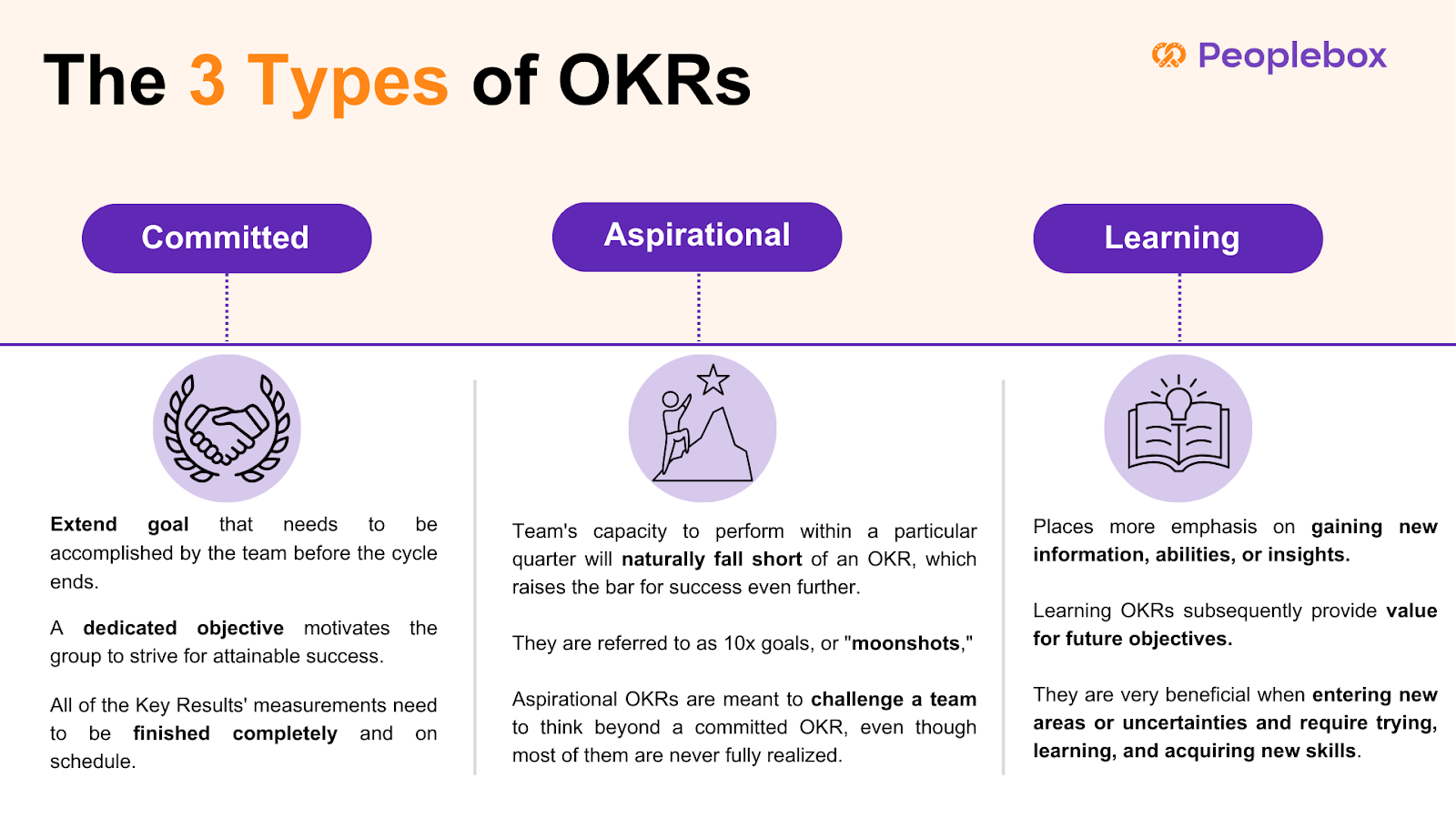
A committed OKR is a stretch goal that the team has to achieve or complete before the cycle is over. A committed goal pushes the team to reach, but still achievable attainment. All metrics of the Key Results must be completed fully and on time. Consider a situation like this:
Daniel’s organization and his teams have agreed to execute certain OKRs and have mapped a precise action plan on how they are going to do so.
These are called Committed OKRs.
An aspirational OKR sets the bar for success further out, and by design will exceed a team’s ability to execute in a given quarter. When they set such a high bar as to be seemingly impossible they are called 10x goals, or “moonshots.” While most aspirational OKRs are never fully achieved, they exist to push a team to think bigger than a committed OKR. Consider the following case:
Martha’s organization is more visionary. They have stretched goals. And her teams are not likely to fully achieve these ambitious goals.
These are called Aspirational OKRs.
Understanding the distinction between aspirational and committed goals is crucial for effective goal-setting and team motivation within the OKR framework. Aspirational goals encourage ambitious thinking and long-term vision, while committed goals focus on immediate, measurable outcomes.
Learning OKR focuses on the acquisition of knowledge, new skills, or insights rather than a direct achievement of business outputs. Extremely helpful when entering new areas or uncertainties and requires experimenting, learning, and developing new skills, Learning OKRs distinguish between usual output measuring of success and measuring acquisition of knowledge, that will later add value for future objectives. For example:
Jerry wants to gain a deep understanding of machine learning to drive full product development. He wants to finish three advanced courses and test his skills by building a model in sandbox.
These are called Learning OKRs.
Aspirational OKRs and Committed OKRs: Key differences
When you aim for the stars, you may come up short, but still reach the moon.
– Larry Page
Read on to find out the key difference between Committed OKRs and Aspirational OKRs.
Objective
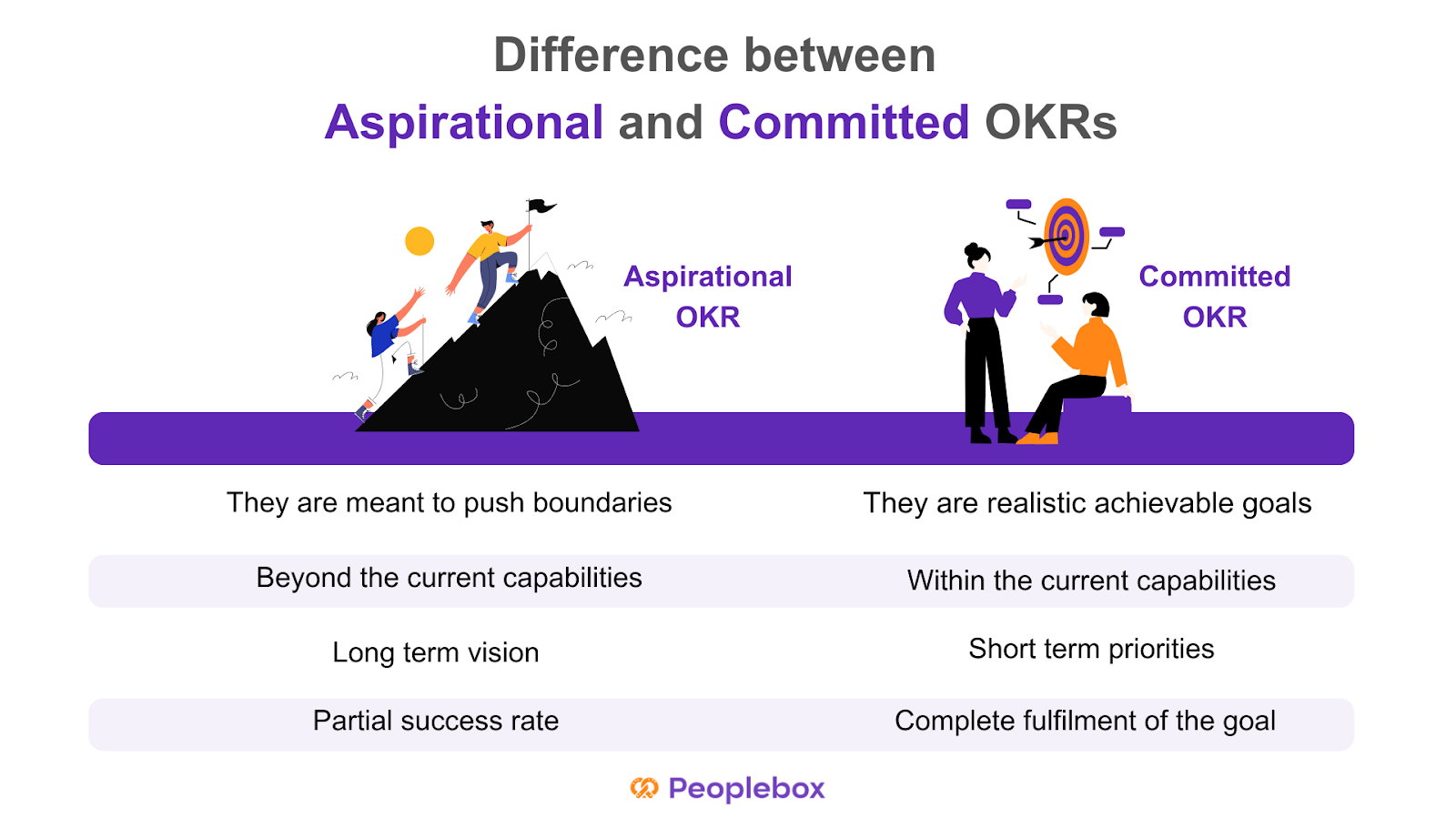
Aspirational OKRs are meant to push the boundaries and encourage employees to achieve visionary objectives. Committed OKRs, on the other hand, focus on committed objectives that offer a more realistic vision of goals with fully achievable results.
Aim
Committed OKRs help companies achieve their goals through individual and team achievements. Aspirational OKRs are often beyond the current capacities of the organization but help in pushing boundaries.
Timeframe
Aspirational OKRs are usually created to focus on long-term strategic vision while Committed OKRs offer short-term operational priorities to guarantee progress in the short term.
Committed OKRs are supposed to have a 100% success rate as each key result comprises fully achievable targets. Aspirational OKRs are usually found to have a success rate of 60-70%.
Committed and Aspirational OKR examples
The difference between committed and aspirational OKRs is subtle. Committed objectives are meant to be fully achievable, requiring teams to concentrate on straightforward priorities without taking unnecessary risks, ultimately serving as motivational tools to foster small wins and consistent progress.
A standard example in the sales team scenario might be like:
Committed OKR
O: Expand to the US market
KR1: Close first 6 start-ups
KR2: Get a meeting-to-close rate of 6%
KR3: Reach average deal size of $200
Aspirational OKR
O: Capture the entire US market in one quarter
KR1: Get onboard 95% of big customers in the US market to grow over competitors
KR2: Get a meeting-to-close rate of 30%
KR3: Reach average deal size of $2000
In the managerial team, these OKRs can manifest like such:
Committed OKR
O: Improve customer satisfaction with the existing solutions
KR1: Increase customer satisfaction score (CSAT) from 85% to 90% by the end of the quarter.
KR2: Reduce average response time from 15 minutes to 10 minutes within the next three months.
KR3: Train 100% of the support team on the new customer service tools within six weeks.
Aspirational OKR
O: Become the market leader in AI-powered customer service solutions.
KR1: Achieve a 30% market share in the AI customer service industry by the end of next year.
KR2: Launch three groundbreaking AI features that no competitor currently offers within 18 months.
KR3: Secure a partnership with at least two top-tier companies by the end of next year.
In a tech context, OKRs like these can come up:
Committed OKR
O: Improve the performance of the app and reliability
KR1: Reduce app crash rate from 2.5% to under 1% within the next quarter.
KR2: Decrease page load times by 30% in six months.
KR3: Fix 100% of the top ten reported bugs within the next two sprints.
Aspirational OKR
O: Revolutionize the user experience of our mobile app.
KR1: Increase daily active users (DAU) by 100% within 12 months.
KR2: Develop and launch a fully AI-driven recommendation system that personalizes the user experience by the end of the year.
KR3: Achieve a 4.8+ rating across app stores by introducing five innovative features within the next 18 months.
How to decide between Committed OKRs and Aspirational OKRs?
Committed OKRs will work best if your organization is newly introduced to the framework or is still in the rolling-out phase.
With each goal achieved, your team’s motivation and engagement will rise higher. In addition, teams easily get into the habit of running Committed OKRs and make it part of their work culture.
But if you have already used the framework in the past, aspirational OKRs can do wonders for you.
Creating a result-driven work culture takes time. It demands discipline, continuous effort, and a mindset shift of employees and management. So you should start simple and focus on learning the methodology first. And set up the necessary processes to make it work.
Setting aspirational OKRs in the very beginning would make your teams feel overwhelmed and over-pressurized. Extremely ambitious Key Results soon become too much to handle. Learning a new methodology takes time. Once your teams are used to the framework and it becomes a part of their work-life, you can consider aspirational OKRs.
With the later process, you can have objectives and a combination of committed and aspirational key results. While some key results will be easier to achieve, others will aim higher. Understanding the distinction between aspirational and committed goals is crucial for better goal-setting and team motivation.
Choosing the Right Type of OKRs
Choosing the right type of OKRs depends on the organization’s goals, culture, and priorities. Committed OKRs are suitable for organizations that need to achieve specific, measurable outcomes within a set timeframe. They are ideal for teams that require a clear direction and a sense of accountability. Aspirational OKRs, on the other hand, are suitable for organizations that want to drive innovation, creativity, and excellence. They are ideal for teams that want to push the boundaries and strive for something bigger.
When choosing between Committed and Aspirational OKRs, consider the following factors:
What are the organization’s goals and priorities?
What type of culture do we want to foster?
What kind of outcomes do we want to achieve?
What level of risk are we willing to take?
By considering these factors, organizations can choose the right type of OKRs that align with their goals, culture, and priorities. Whether you opt for committed or aspirational OKRs, the key is to ensure that they are aligned with your company aims and internal communication processes, fostering a balanced approach to achieving both immediate and long-term objectives.
How to balance Committed and Aspirational OKRs?
There is no one-size-fits-all answer, but where OKRs are aligned with company strategy, teams are well educated, open communication exists, and performance is reviewed regularly, it will help keep the balance between aspirational and committed OKRs intact.
However, the first step in finding equilibrium between the two forms of OKRs is that there has to be a knowledge of the difference. It needs to be apparent from the outset that everyone involved makes it clear the distinction between the two OKRs.
Teams and employees may have suitable insights that will assist in determining what is realistically achievable (committed) and what is a stretch but possible (aspirational). This can help determine what the balance ratio for the OKRs is going to be.
A very critical element to succeed with OKRs is reviewing and tracking the progress. With weekly check-ins, teams can go through their OKRs regularly and update the same performance data. It becomes easy to track how they have progressed on the outcome of the OKR in the OKR review process.
The grading of OKRs is very clear on the distinction between committed and aspirational goals. Committed OKRs are things to be accomplished within the cycle, and grading is binary: pass or fail. That is, an OKR is said to be successful if 100% of it is accomplished; otherwise, it is regarded as a failure. Aspirational OKRs, on the other hand, are graded along a more nuanced scale.
Common mistakes to avoid while setting up Aspirational OKRs
Here are 6 common mistakes organizations commit while setting up aspirational OKRs-
1️⃣Ignoring organizational structure and needs
A common mistake most organizations commit while writing aspirational OKRs is to write something like, “What can be done more if we have extra resources and luck favors us ?” Instead, you can pretend to be a genie and strive to understand “What our customer needs at present moment?”
2️⃣Unrealistic aspirational OKRs
Aspirational OKRs don’t imply setting unrealistic goals. It should be achievable, with the understanding that your teams won’t have any clue about how to achieve these OKRs. Aspirational OKRs demand overuse of resources. They are fluid and flexible. But still helps your teams focus on well-defined goals.
3️⃣Writing a low-value objective (LVO)
Moving forward with a “Who cares?” attitude is a common pitfall among organizations. Low-value objectives go unnoticed even after the successful completion of the key results.
4️⃣OKRs should be framed to gain tangible benefit
OKRs are a tool for organizations to work for big goals in the long run by breaking them into small chunks that can be achieved within a shorter cycle.
5️⃣A committed OKR must deliver a 1.0
It makes the framework stiff and doesn’t leave scope for improvement.
6️⃣Too many OKRs
How many aspirational OKRs you should set for one cycle will depend on your company’s resources. But never aim for too many Objectives and key results. As it can easily divert your focus altogether.
Best Practices for Implementing OKRs
Implementing OKRs requires a structured approach to ensure success. Here are some best practices to consider:
Align OKRs with company goals: Ensure that OKRs align with the organization’s overall goals and priorities.
Make OKRs specific and measurable: Ensure that OKRs are specific, measurable, achievable, relevant, and time-bound (SMART).
Set ambitious yet achievable goals: Set goals that are challenging yet achievable, and provide a clear direction for the team.
Establish clear key results: Establish clear key results that indicate progress towards achieving the objective.
Track progress regularly: Track progress regularly and provide feedback to teams and individuals.
Foster a culture of transparency and accountability: Foster a culture of transparency and accountability, where teams and individuals are held accountable for their progress.
Provide training and support: Provide training and support to teams and individuals to ensure they understand the OKR framework and how to use it effectively.
Review and adjust OKRs regularly: Review and adjust OKRs regularly to ensure they remain relevant and aligned with the organization’s goals.
By following these best practices, organizations can implement OKRs effectively and achieve their goals. Regularly reviewing and adjusting OKRs ensures that they stay aligned with the evolving needs of the organization, helping teams to maintain focus and drive continuous improvement.
Conclusion
Now that you know the difference between committed and aspirational OKRs and how they can impact your organization’s success, it’s the decision time. Choose the one that will best suit your purpose.
And don’t forget it’s a trial and error method. Have regular OKR check-ins and reviews. Collect feedback during and after each cycle. And use your learnings to avoid further mistakes in the next OKR cycle.
Pooja Pooja
Quarterly OKRs: 5 Tips for Successful Wrap-Up
Imagine a scene! the quarter is about to end and it’s time to review and wrap up quarterly OKRs.
The clock’s ticking. Everyone is in a rush. And you are busy evaluating which goals are yet to be achieved. And what has already been done. It’s also time to think about your priorities for the next quarter.
There are so many checklists and questions going in your head.
Have my teams found ways of closing out quarterly OKRs? Will my teams beat the clock and tick all the boxes? Have they reflected on their OKR progress? How will I deal with this end-of-quarter OKRs rush?
Feeling overwhelmed!!
Here is a step by step guide to help you prepare best to wrap up your quarterly OKRs–
Before you start to review and wrap up quarterly OKRs- remember that wrapping up quarterly OKRs is teamwork. And to see the best results every team irrespective of their department have to come together.
Track your team’s OKR progress and gather the key results scores. You can score your OKRs on a scale of 1 to 10 on the basis of how far the objectives have been achieved.
This will help you evaluate your progress in a truly data-driven manner.
If the scores are low this might suggest that your OKRs were unrealistic. On the other hand, if the score is too high it may suggest that your OKRs were not ambitious enough.
Whatever learning you made from this process. It will help you to form the basis for designing your next set of quarterly OKRs.
Make sure everyone is up to date
It is important to ensure that your teams have clarity about their OKR status. At the same time, they have visibility into what other teams have been doing. It can be achieved through regular check-ins with your teams. Check this ebook on OKR handbook.
This step will help you check if your teams are aligned or not. When everyone in your team is on the same page taking decisions based on priorities becomes easy. As you have the data in hand to rely on instead of guessing.
Organize OKR check-ins
The importance of check-ins for OKR success cannot be emphasized enough. OKR check-ins provide you an opportunity to have 1 on 1 discussion in all OKR matters.
With OKR check-ins you can discuss with your leaders and team members about – what went well, what didn’t work for them, what needs to be dealt with immediately, what problems they are facing etc. at an individual as well as team level.
OKR check-ins will help you understand what’s holding teams back. You will further get the chance to push priorities that might have shifted midway.
Dig into opportunities
Organize Quarterly OKRs review meetings to dig into opportunities. During these meetings, go through each key result with your teams. Find out what went well and what needs to be done better.
Let the OKR leaders from each team present their learnings and achievements before everyone. Here teams can give a small presentation highlighting the most important lessons with context.
So that other teams can benefit from their learnings and experiences. And use them in designing their OKRs for the next quarter.
If you are a large-scale company working with multiple departments. The OKR review meetings can be held at the departmental level.
Plan the future
Now that you have gathered the data and matrix you need through OKR check-ins and OKR review meetings. It’s high time to plan for the next quarter.
OKRs have the power to build the future of your organization. But OKR failures can cost you a fortune.
Hence it’s important to find out the core reasons behind your OKR success or failure for the present quarter. And use it as context while designing OKRs for the next quarter.
[elementor-template id=”89725″]
Do you need to plan new OKRs every quarter?
“Should OKRs change every quarter?” is a question often left unanswered.
Even after an OKR is achieved, you can roll it forward for the next quarter if necessary.
For example, if your OKR was to increase customer satisfaction by 20% in the present quarter. This could be relevant even for the next few quarters.
In case, of missed OKRs, you need to take a call. And decide whether you want to carry it forward or set new OKRs based on the data gathered.
When should you review and wrap up Quarterly OKRs
You should preferably wrap up the quarterly OKRs at least a week prior to the beginning of the next quarter.
But the preparation and discussions for the next quarter should be initiated almost a month before the new quarter begins. This is because designing OKRs takes dedication, time, and effort.
Bonus Tips:
Maintain Transparency from day one. Keep data transparent so that everyone knows how it’s going.
Create a culture of critical feedback. Be honest when it comes to feedback. At the same time be open to getting feedback from your teams as well.
Celebrate wins– even the smallest ones. Recognize your teams for their achievements more often.
Over-communicate. Communication is the key when it comes to wrapping up quarterly OKRs.
Take a moment
Wrapping up end-of-quarter OKRs will allow you to pause and take a moment to think. It provides you time to reflect on your wins, failures, and setbacks. It’s a stitch in time to make sure that your OKR framework is a success.
Follow the steps given to close out quarterly OKRs and make the most out of the process.